Path to Raytracing(Pun intended) | Part 1
Introduction
This log goes into my journey behind discovering the truth behind virtual 3D objects. Whatever I mention in this devlog might not be right (and it probably isn’t), I’m just conveying whatever I’ve understood based on my own trial and errors. If I’m wrong, please correct me and help me learn! I’ve always been fascinated by how games work. I know what a ‘cube’ is, but how does a game draw such a cube on my screen without much effort? Questions like these led me on a short journey to understand the basics of “rendering”, aka drawing images on screen using math.
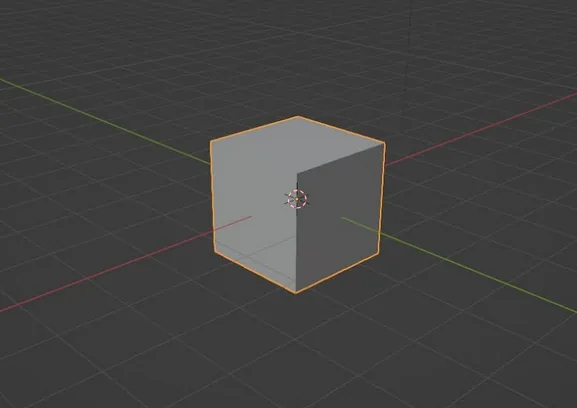
There are many ways of rendering, one efficient and popular way is to represent the object in terms of points on screen; Then connecting these points with lines, forms triangles. When a bunch of these triangles come together, they are called a mesh. These triangles are colored based on a given texture color.
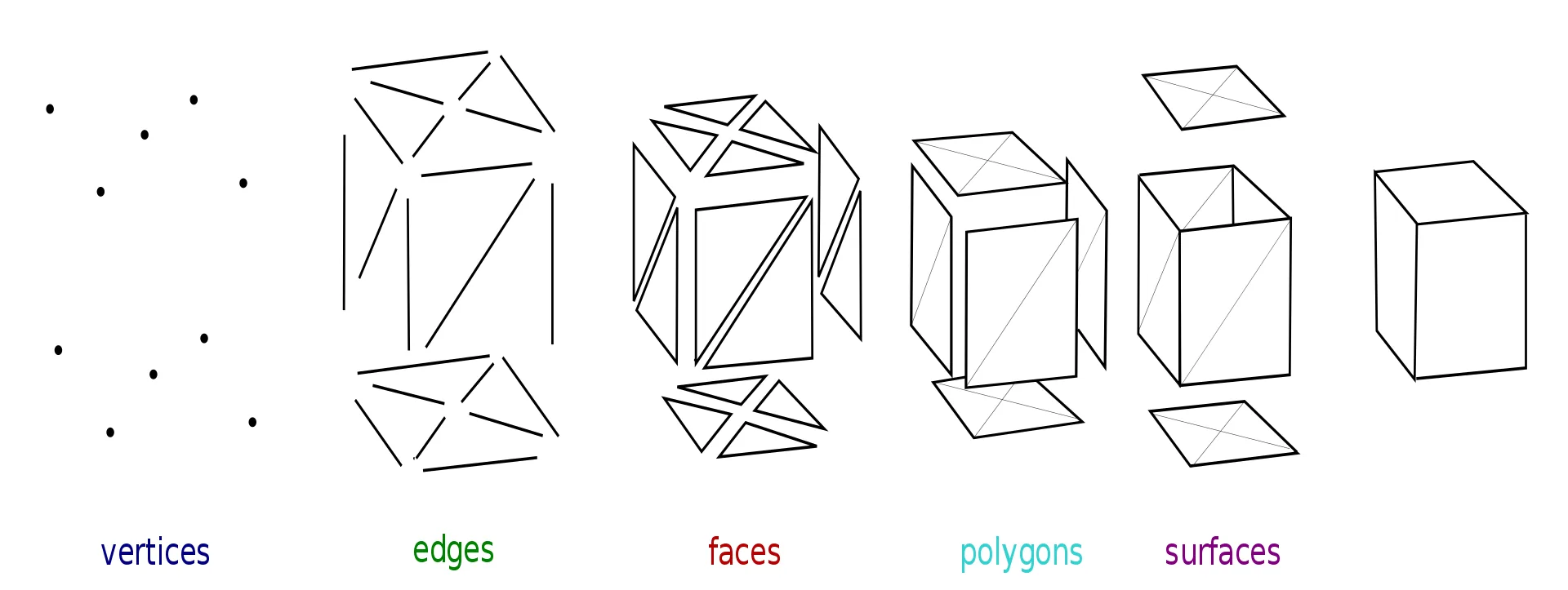
The information for the triangles are then sent to the GPU (Graphical Processing Unit) which can calculate the position of the points relative to your screen shape, draw them, and color in the triangles. The CPU is quite small, and is focused more on the L in ALU (Arithmetic and Logic Unit). The CPU has a lot of cache memory, and is geared to work around Arithmetic and Logical calculations. Whereas the GPU is more geared towards Arithmetic calculations only, it has less cache as well. The GPU contains multiple cores which can process multiple calculations per second, whereas the CPU only has 4-8 cores (on a modern day average PC).
This kind of rendering is employed by many games and softwares as it is really fast, less expensive memory wise, and it’s very easy on the math side too!
Most rendering math, FX, lighting, shadows, etc work on a lot of little tricks and hacks to lift up the load on processors, hence it makes images look a little bit fake-ish (nowadays, there have been many improvements which give a real-ish look to this kind of rendering, it’s all about finding the right trick to employ at what instance)
Another method of rendering is raytracing. Raytracing doesn’t break down objects into points, but instead treats the object as a whole. It’s a method which treats light rays ‘emitted’ by a light source as a real light ray (I won’t go into the question if light is a particle or wave here, that’s the job of physicists to figure out, although it is really cool to think about. Here we consider light as photons, or basically the beam which the photon traces) and calculate the way in which light interacts with the objects in the scene to give it a real life-like look. All these calculations are immense, and hence it takes a lot of time for a computer to render such a scene. RTX = Raytracing
Most games/softwares which allow ray tracing, allows one to run all the required calculations on the GPU. I, on the other hand, started learning C++ just a few months back, so I don’t really know how to send and receive data to and from the GPU in this language, and if I tried to do it, I might end up with a broken system which is even more slower than what it is already right now due to some in-efficient usage of memory. All calculations in my system work on the CPU. I have tried running the calculations parallelly/concurrently using multiple threads, but that just gives it a boost of 2-3 seconds for 1-3 spheres per frame as far as i’ve tested, which isn’t a lot at first, but it is a lot of seconds saved when I render multiple frames to record an animation. I’m probably doing something wrong and in-efficient, but I don’t know just yet.
Basic Vector Mathematics
Before I move into vector math, let’s recall what dimensions really are. When I say the word “Dimension”, many people first think about sci-fi, parallel universes. The Sci-fi definition probably pops up in your mind when I use the term “Dimension”.
Dimension is a mathematical term which can simply be understood as different quantities which are totally unrelated to each other. North-South, East-West, Up-Down, is a common example used for dimensions. In this particular example, we see 3 directions, which are totally unrelated to each other. If I move 5 steps North, I can’t tell how much I’ve moved in the East-West direction.
The number of dimensions are also taken in reference to the data we have recorded, for example, a point in space can be given coordinate data of 3 Dimensions (Example, point at {0, 0, 0}), if the space is 3D in nature. Another example of Dimensions is: Distance vs Time graphs.
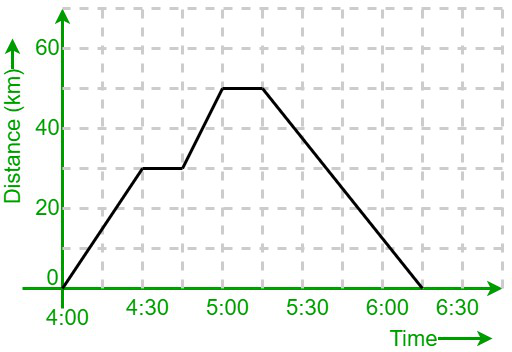
Here, the Time (which is considered as a Dimension in “reference” (which is the keyword here), to the graph/recorded data) is plotted on the X-axis. Distance (another Dimension in reference to the graph) is plotted on the Y-axis. We draw this information spatially up-down, left-right as it is way easier for our brain to grasp and visualize spatial information rather than just numbers.
The given graph can also be written down like this
| Time | 4:00 | 4:15 | 4:30 | 4:45 | 5:00 |
| Distance | 0 | ~15 | 30 | 30 | 50 |
| Time | 5:15 | 5:30 | 5:45 | 6:00 | 6:15 |
| Distance | 50 | ~58 | ~25 | ~10 | 0 |
I think everyone can agree that the graph is a better way of representing data rather than a table like this. The table gives accurate data, but it’s very hard to visualize things when given in a table format.
Vector
A Vector is an N-dimensional object. A 2D vector has 2 independent components, which one can name those components as x, y, or i, j, etc. A 3D vector, similar to a 2D vector has 3 independent components, which by math conventions are named i, j and k. The same can be said to other higher dimensional vectors.
This set of 2 to 3 numbers can easily be represented as a table of information.
Vector3D A = (0, 0, 0). Vector3D B = (0.5, 100, -15). Vector2D C = (1, 2), etc
This however, as confirmed previously, is a bit hard to visualize. To help us understand and make sense of these sets of numbers, we can draw them spatially. I will be using Desmos and Geogebra to draw most of these diagrams.
Visualizing 2D Vectors
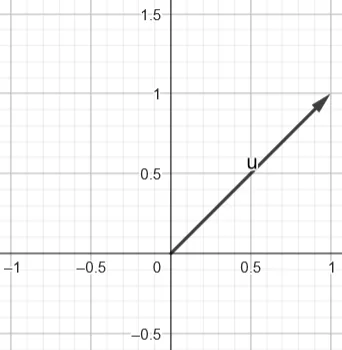
This diagram represents a 2D vector (1, 1). We can imagine the 1st Term to be on the X-axis, the 2nd Term lies on the Y-axis. Hence the resultant vector diagram looks something like this.
Here are a few more examples of vector diagrams and their (i, j) / (x, y) representation.
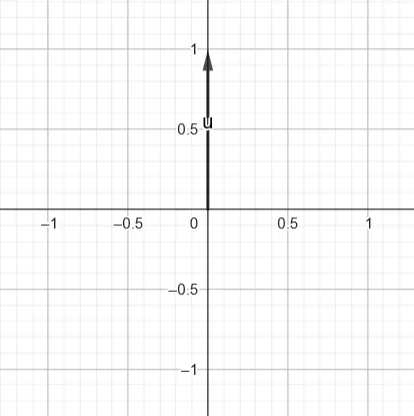
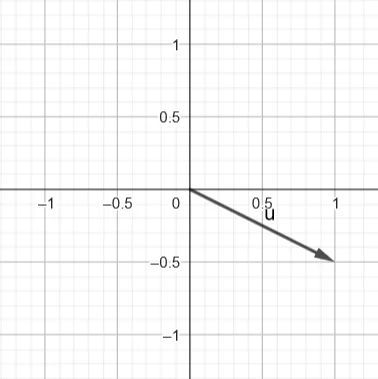
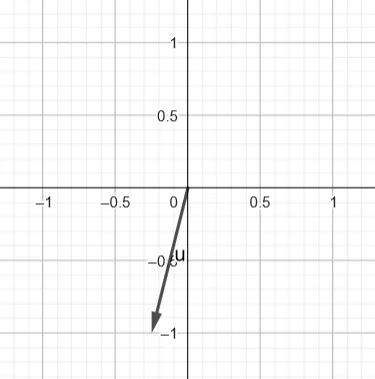
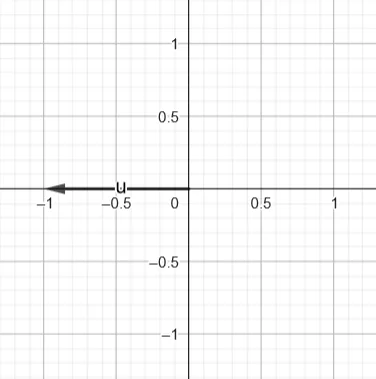
Hopefully these vector-illustrations have helped you understand how to imagine the given set of 2D numbers as an arrow in space. In-fact, Complex numbers in math are literally just 2D vectors.
A vector can also be represented in another way which includes the magnitude/distance/strength of the vector, and its angle to the X-axis
Whenever next I represent an angle with a ‘°’, that represents degrees, and when I don’t use them, that will represent radians. Radians is another form of representing angles, and it is used a lot more in math than the ° notation.
All you have to know is,
$\text{deg}^\circ \times \frac{\pi}{180^\circ} = \text{rad}$
$\text{rad} \times \frac{180^\circ}{\pi} = \text{deg}^\circ$
| Degree | 0° | 90° | 180° | 270° | 360° |
| Radian | 0 | $\frac{\pi}{2}$ | $\pi$ | $\frac{3\pi}{2}$ | $2\pi$ |
Here are a few more examples of vector diagrams and their (magnitude, degrees) representation.
Jumping into calculation math territory here, don’t get freaked out by the symbols. You can feel free to skip this part for now.
The magnitude/total distance of a vector is written as |Vector| which is equal to $\sqrt{x^2 + y^2}$, and the angle it makes with the x-axis is represented by $\text{(0° or 180°)} + \theta = \tan^{-1}(\frac{y}{x})$, where $\theta$(theta) denotes the angle.
The vector is at $0^\circ$ when it is in the configuration of $(1, 0)$, it’s at $90^\circ$ at the configuration of $(0, 1)$. Try to visualize these sets of numbers. The vector basically spins in an anti-clockwise rotation.
$\rightarrow \frac{1}{0}$ is technically undefined, but we use the limit definition of anything /0 is $\infty$
$(1, 90^\circ)$ or $(1, \frac{\pi}{2})$
Anyways, I digress. Just wanted to dip my feet in a little bit of math to warm up.
Remember, Vectors aren’t related to any specific position. They just hold information such as the magnitude and direction of the said vector. Math also sets down some important rules regarding calculations of vectors.
\[\begin{aligned} (x, y, z) + (i, j, k) &= (x + i, y + j, z + k)\\ (x, y, z) - (i, j, k) &= (x - i, y - j, z - k)\\ \alpha(x, y, z) &= (\alpha x, \alpha y, \alpha z) \end{aligned}\]Multiplying a single number to a vector helps us scale up the vector linearly!
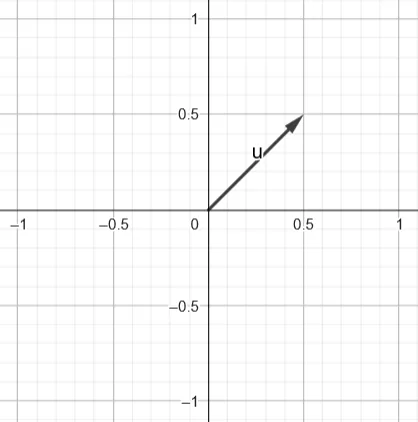
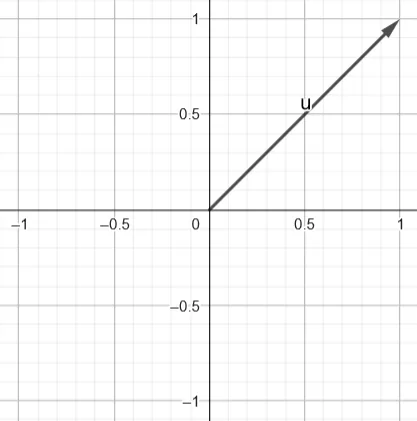
Dividing a vector by a number is similar to multiplying it with (1/num).
$\lvert(x, y, z)\rvert = \sqrt{x^2 + y^2 + z^2}$
|(x, y, z)| denotes the magnitude of the vector. Imagine squishing all the dimensions of the vector into one “magnitude” dimension.
We can’t multiply vectors as one might think, but instead we have 2 types of products/multiplications, dot product and cross product.
Dot product gives us a single number instead of a vector:
$(x, y, z) \cdot (i, j, k) = x \times i + y \times j + z \times k$
Cross product gives us a vector, the calculations work something like this The resultant vector faces in a direction which is $90^\circ$ to both the input vectors.
\[\begin{aligned} (x,y,z)\times(i,j,k) &= \begin{vmatrix} \hat{i} & \hat{j} & \hat{k} \\ x & y & z \\ i & j & k \end{vmatrix} \\[12pt] &= \hat{i}(yk-zj) - \hat{j}(xk-zi) + \hat{k}(xj-yi) \\[12pt] &= (yk-zj,\; zi-xk,\; xj-yi) \end{aligned}\]($\hat{i}$ is just the direction $i$ was pointing at)
A small point to understand, the dot product of 2 vectors (say A, B) is also equal to $\lvert A \rvert \lvert B \rvert \cos(\theta)$, where $\theta$ is the angle between the vectors themselves.
Keeping in mind, the graph of $\cos(\theta)$ and $\sin(\theta)$ can help a lot while dealing with equations and understanding them.
$\cos(0) = 1$, therefore if the vectors are facing the same direction, the dot product of A and B, is just $A \times B$ {Think about 1D number line, $AB$ would just be $\lvert A \rvert \times \lvert B \rvert$, as the 1D vector can’t be rotated on a 2D surface}
If the vectors are $90^\circ$ apart, $\cos(90^\circ) = 0$, the dot product would just be 0
If the vectors are $180^\circ$ apart, $\cos(180^\circ) = -1$, the dot product would be $\lvert A \rvert \times \lvert B \rvert \times -1$
And so on…
Normalizing a vector is basically a way to make a given vector (of say, some magnitude $X$, and some direction $\theta$) into a unit vector, which has a magnitude of 1, and the direction remains the same($\theta$).
Normalised $\hat{x} = \frac{\vec{x}}{\lvert \vec{x} \rvert}$
From now onwards, $\vec{x}$ represents any vector, and $\hat{x}$ represents any unit vector (any vector with a magnitude of 1). All unit vectors are vectors, but not all vectors are unit vectors.
Normalizing basically gives us a multiplicative identity of the vector in that direction, so if we wanted to scale up the vector, we can just multiply the given unit vector with a single number. An example of normalizing on a 1D vector (i.e a number line) can be imagined like this.
Taking x as -5, when we try and normalize this 1D vector we get this:
$\hat{x} = \frac{\vec{-5}}{\lvert \vec{-5} \rvert} = \frac{-5}{\sqrt{(-5)^2}} = \frac{-5}{\sqrt{25}} = \frac{-5}{5} = -1$
Taking x as 10, when we try and normalize this 1D vector we get this:
$\hat{x} = \frac{\vec{10}}{\lvert \vec{10} \rvert} = \frac{10}{\sqrt{(10)^2}} = \frac{10}{\sqrt{100}} = \frac{10}{10} = 1$
As we can see, The 1D vector has been “normalized” to a unit vector of magnitude 1, but it still retains its directional information (in a 1D vector, the direction is just denoted by the +/- signs). We can now use this normalized vector to get other vectors in this general direction by multiplying any number to scale up this normalized vector ($-1 * 6 = -6$; $8 * 1 = 8$). The same can be applied to multiple dimensional vectors.
One last important piece of information, there are different ways to orient the x, y, z axis in a 3D world space, but for my project I have gone with something that looks like this.
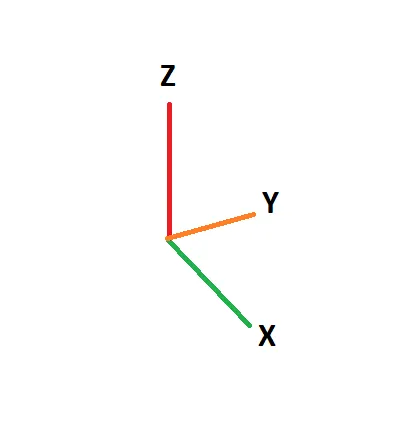
Imagine X value increases as one goes to the right. Y value increases as one goes forwards. Z increases as one goes upwards.

Many systems make use of the right hand system. Many systems also take ‘Z’ as the UP vector, and ‘Y’ as the SIDE vector (which we will be following). We will be sticking with the Left hand system throughout our project.
Here’s a small test to see if you could keep up with the math, What is $(1, 0, 0) \cdot (0, 0.826, 0)$? There are 2 formulas or one simple mathematical property which can be used to figure out the answer.
SPOILERS, Click to reveal answer
Using $(x, y, z) \cdot (i, j, k) = x \times i + y \times j + z \times k$: $$ \begin{aligned} (1, 0, 0) \cdot (0, 0.826, 0) &= (1 \times 0) + (0 \times 0.826) + (0 \times 0)\\ &= 0 \end{aligned} $$ Using $\lvert A \rvert \lvert B \rvert \cos(\theta)$: $$ \begin{aligned} \lvert (1, 0, 0) \rvert &= \sqrt{1^2 + 0^2 + 0^2}\\ &= \sqrt{1^2}\\ &= 1\\ \lvert (0, 0.826, 0) \rvert &= \sqrt{0^2 + 0.826^2 + 0^2}\\ &= \sqrt{0.826^2}\\ &= 0.82\\\\ \theta &= 90^\circ\\\\ 1 \times 0.82 \times \cos(90^\circ) &= 1 \times 0.82 \times 0\\ &= 0 \end{aligned} $$ Using Property:If the vectors are $90^\circ$ apart, $\cos(90^\circ) = 0$, the dot product would just be 0
We know, X component of A is non 0, and Y component of B is non 0, while all other components in A and B are 0.
Hence we can conclude, A is pointing towards X, B is pointing towards Y. X and Y axis are $90^\circ$ apart, and hence using our property, we can just conclude that the dot product of A and B is just 0.
Visualizing Vector Mathematics
Alright, let’s stop with all the ugly math and numbers for now. Let’s try to visualize what is exactly happening when I say $(0, 0.25, 5) + (7.2, 58, -87)$.
Yes, i’m sorry for lying, you can’t really escape math and numbers, they might as well haunt your life, so just accept your fate
Addition of vectors
Let’s take 2 example 2D vectors, $u = (1, 0)$ and $v = (0, 1)$
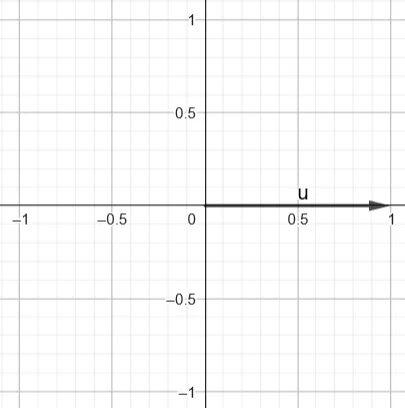
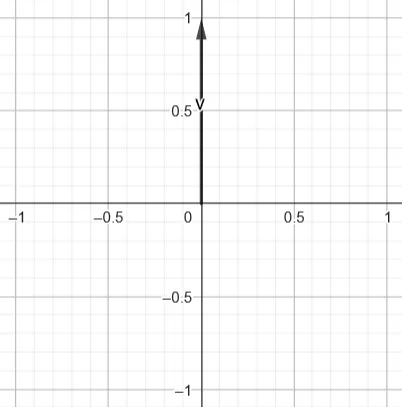
When I add them up together:
\[\begin{aligned} (x, y) + (i, j) &= (x+i, y+j)\\ (1, 0) + (0, 1) &= (1, 1) \end{aligned}\]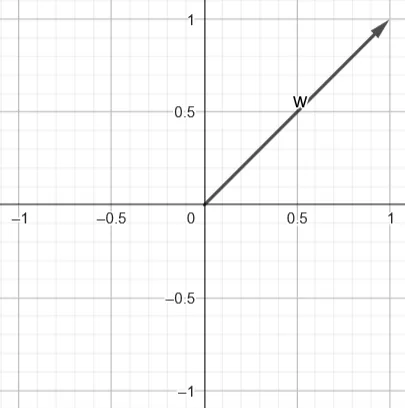
In all my illustrations of vectors, the starting position has always been (0, 0), but as i’ve told in the previous chapter vectors aren’t “connected” to any point; We just take (0, 0) as a common point, to visualize them.
A 2D Vector just holds 2 pieces of information:
- Their own magnitude/strength.
- Their direction/angle (in relation to some axis, typically the X-axis).
So, if vectors don’t have a starting point, nor an ending point, we can draw the 2 example vectors given above together, like this:
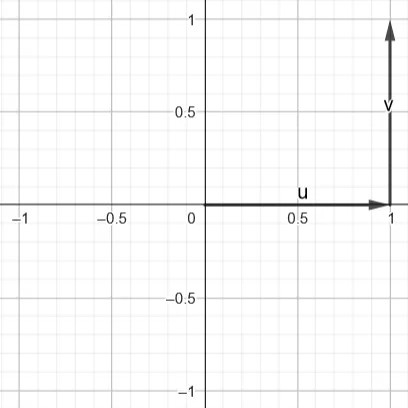
$v = (0, 1)$
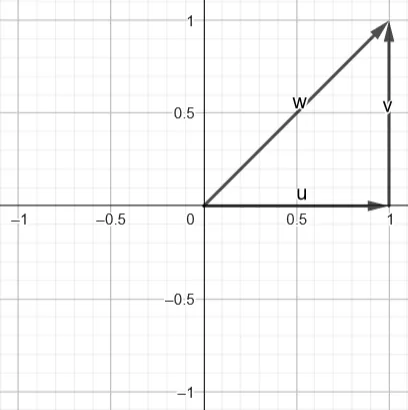
The resultant vector on the same graph looks something like this:
$v = (0, 1)$
$w = (1, 1)$
This forms a triangle! Well, any 3 points connected together using lines forms a triangle on the plane of the 3 points. Take a look at the vector directions, $u + v$, where u is facing the starting position of v (again, we have just moved v’s starting position, as it doesn’t really matter), and the resultant vector starts from u’s starting position, and points at v’s ending position (ending position doesn’t matter as well).
This is the triangular law of vector addition!
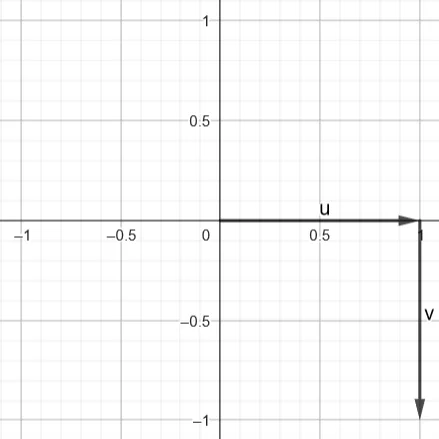
Vector subtraction is similar, but the only difference is, we’ll be rotating the vector which is the subtrahend (totally didn’t search that term up, yup) $180^\circ$ across, before adding them up using the triangular law!
$v = (0, 1)$
$-v = -(0, 1)$
$-v = (0, -1)$
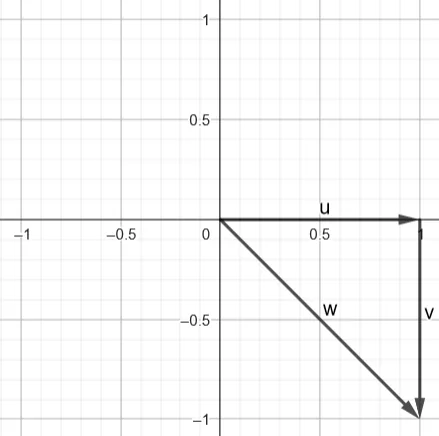
We have already gone through multiplication of a 2D vector with a linear term (single number), but I will re-paste the example here.
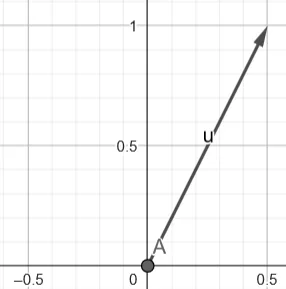
Normalizing of a vector (i.e getting a unit vector in the same direction):
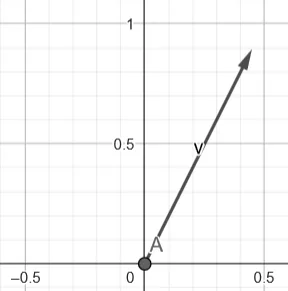
$\lvert v \rvert = 1$
$v = (0.4472, 0.8944)$
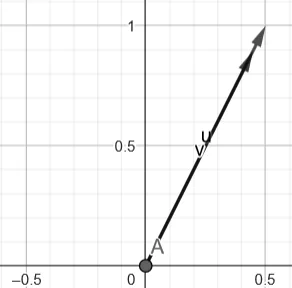
$u = (0.5, 1)$
$\lvert u \rvert = 1.118$
$v = (0.4472, 0.8944)$
$\lvert v \rvert = 0.99996959… ~1$
As we can see, the angle is the same
All these mathematical relations can be drawn for the 3rd dimension as well! I urge you to try and visualize these examples but in a 3D form, especially using your left hand to visualize the X, Y, Z axes.
A Science student in a 11th/12th grade physics exam, tends to hold their left and right hand out awkwardly, turning and twisting them to try and visualize 3D vectors! Go crazy, look at 3D objects and create a copy of it in your mind. Try imagining a box, and rotate it in your mind. Spin it around, look at it from the top, now look at it from the bottom, look at it from the backside! Do everything that helps you try and visualize 3D objects in your mind.
Visualizing and Usage of Basic Trigonometry
Percentages are very useful! Imagine a water tank. When I say the water tank is $50\%$ filled, you imagine the tank half filled. One can say, percentages act sort of like a Mathematical factor. If the water tank can hold $123$ liters of water, and if I were to say its $50\%$ filled, the total amount of water in said tank would be $(123 \times (50/100))$. The $50\%$ reduces to $50/100$ which works as a factor, on which after multiplying it with the ‘Total amount’, gives you the ‘Required amount’.
$50\%$ of $123$ liters is = $61.5$ liters.
Where many people use percentages, most mathematicians just scale down the percent range from $(0\% \to 100\%)$ to just between $(0 \to 1)$. To be honest, $50/%$, when reduced, becomes $50/100$, and when solved, gives us $0.5$ as the ‘factor fraction’. It’s just another way of representing percentages.
\[\begin{aligned} 0\% &= 0.0\\ 25\% &= 0.25\\ 50\% &= 0.5\\ 75\% &= 0.75\\ 100\% &= 1\\ \end{aligned}\]Similarly, Trigonometric ratios are just fractions and percentages. The term ‘ratio’ in their name literally suggests that.
The basic trig functions are $\sin$, $\cos$, and $\tan$. I won’t be going over the textbook definition, as, If I wanted to do that, I wouldn’t be writing this devlog, and I would ask the reader to just go read a textbook.
$\sin(\theta)$ basically gives the magnitude of the “Vertical” component of a unit vector which makes an angle with the +x axis.
$\cos(\theta)$ gives the magnitude of the “Horizontal” component of a unit vector which makes an angle with the +x axis.
Keep in mind: Vertical and Horizontal components might not always be Y-axis, and X-axis respectively. It depends on the orientation of the observer, the ‘axis’ which was taken as reference, the total angle made in relation to this reference angle, etc.
$\sin$, and $\cos$ returns back a single number which sort of works like a percentage(not exactly). $\sin$ gives the magnitude of this vector which is pointed vertically, and $\cos$ gives the magnitude of this vector is pointed horizontally. Like other percentages, $\sin(\theta) + \cos(\theta)$ adds up to 1. Does it? Well, not exactly~ Circles are sort of weird in their own ways! That’s why they aren’t exactly percentages.
By the way, rotations in math conventions are taken in an anticlockwise direction, and are measured from the +x axis.
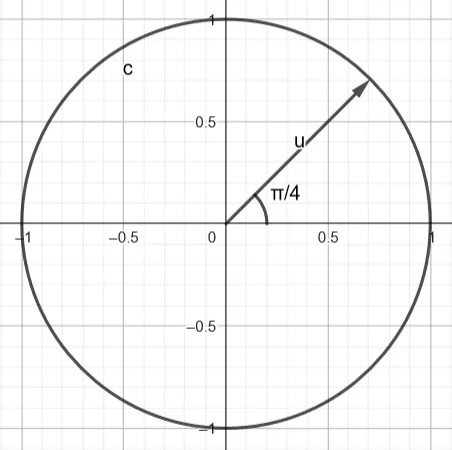
Imagine a unit circle(a circle whose radius is exactly 1 unit), and a vector on it. We know the magnitude of this vector is also 1 unit long. The vector is $\frac{\pi}{4}$ radians from the +x axis. [Recall, $\frac{\pi}{4} \text{radians} = 45^\circ$]. Therefore $\sin(\frac{\pi}{4}) = \frac{1}{\sqrt{2}}$, $\cos(\frac{\pi}{4}) = \frac{1}{\sqrt{2}}$.
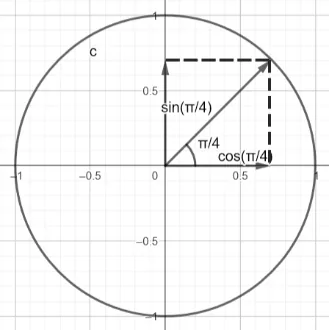
$\frac{1}{\sqrt{2}} ~ 0.707$, which is $70.7\%$. Therefore adding $\sin(\frac{\pi}{4}) + \cos(\frac{\pi}{4})$, we get $1.414$, which is $141\%$, which doesn’t make much sense. Hence, to get a proper percentage value which fits in between 0 and 1, we square the 2 terms, and then add them up together!
\[\begin{aligned} (\sin(\frac{\pi}{4}))^2 + (\cos(\frac{\pi}{4}))^2 &= \sin^2(\frac{\pi}{4}) + \cos^2(\frac{\pi}{4})\\ &= (0.707)^2 + (0.707)^2\\ &= 0.499 + 0.499\\ &= 0.998 ~1 \end{aligned}\]Hey, there’s a trig identity!
$\sin^2(x) + \cos^2(x) = 1$
We can imagine the trig identity in a similar fashion! Let vector a have an up component of $\sin(\theta_a)$, and let it have a horizontal component of $\cos(\theta_a)$. To get the total magnitude, we need to $\sqrt{x^2 + y^2}$, which in this case would be $\sqrt{\cos^2(\theta_a) + \sin^2(\theta_a)}$, and as the amplitude of $\sin$ and $\cos$ is just $1$, we don’t need to take a square root, as $\sqrt{1} = 1$. Thus, we can also prove why $\sqrt{\cos^2(\theta_a) + \sin^2(\theta_a)} = 1$, for any angle $\theta_a$.
If my vector had a magnitude other than 1, then I would have to just scale up/down my factor (which in this case, is either $\sin$ or $\cos$ function) by the magnitude of the vector linearly. The Vertical component of $a = (4, 2)$ is $\lvert a \rvert \times \sin(\theta_a)$, similarly, the horizontal component of a would be $\lvert a \rvert \times \cos(\theta_a)$.
If you would have seen the previous Image, then you might have figured out, you can convert these factors into a vector on the axis, and then add them up together to get the initial vector back.
Example:
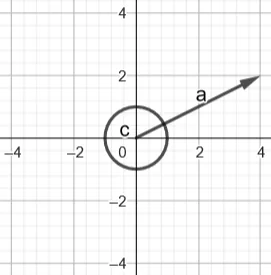
$a = (4, 2)$
$\theta_a = 0.4636 = 26.5^\circ$
Vertical component factor (i.e VC) =>
\[\begin{aligned} (\lvert a \rvert \times \sin(\theta_a)) &= \lvert a \rvert \times 0.44717\\ &= 4.4721 \times 0.44717\\ &= 1.999 ~ 2 \end{aligned}\]This will be equal to the y component of the vector, as we are oriented in a way, y is equal to the vertical component
Horizontal component factor (i.e HC) =>
\[\begin{aligned} (\lvert a \rvert \times \cos(\theta_a)) &= \lvert a \rvert \times 0.8944\\ &= 4.4721 \times 0.8944\\ &= 3.999 ~ 4 \end{aligned}\]This will be equal to the x component of the vector for similar reasoning.
\[\begin{aligned} (\text{VC} \times (0, 1)) + (\text{HC} \times (1, 0)) &= a\\ (2 \times (0, 1)) + (4 \times (1, 0)) &= (0, 2) + (4, 0)\\ &= (4, 2) \end{aligned}\]We went a full circle (trig pun unintended), and came back to the vector.
I urge you guys to visualize this! Try coming up with various other random vectors, and go full circle, and come back to the original vector. Calculator will be your friend! Also do try to use radians as much as possible.
Try to relate whatever you’ve learnt so far, and apply it to the given animation down below, and understand what is truly happening here!
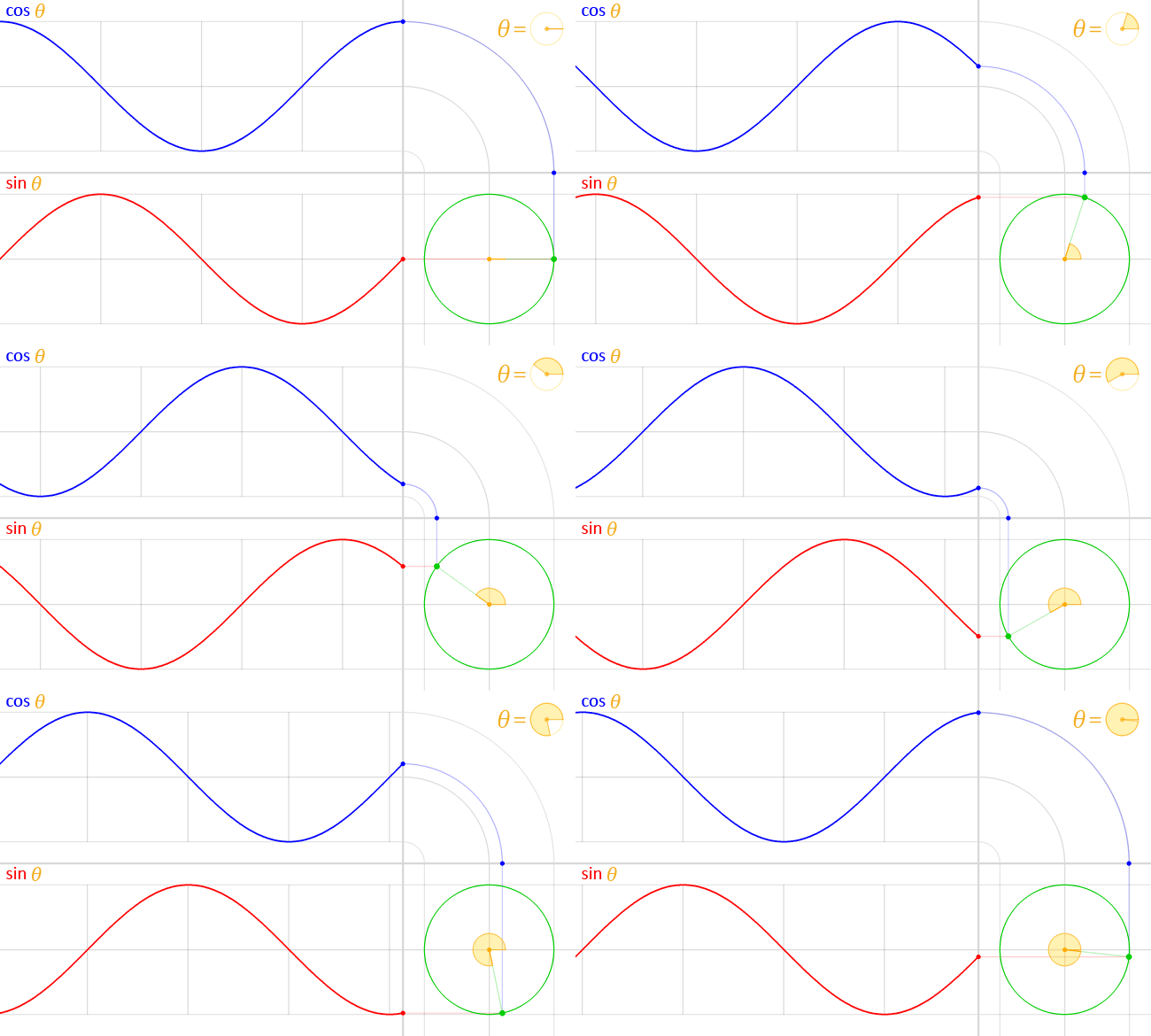
Last function I will be going over is, $\tan^{-1}(x)$.
$\tan(x)$ is defined as $\frac{\sin(x)}{\cos(x)}$. It has a bunch of really interesting use cases, but it isn’t used much here, so I won’t be going over it. $\tan^{-1}(x)$ however has an interesting use case of finding the angle of a vector, in relation to the x-axis(keep in mind, it’s in relation to the x-axis, it doesn’t have to be +x, it can also be from the -x side).
$\tan^{-1}(x)$ is defined as the inverse of $\tan(x)$, it has a domain of $(-\infty, \infty)$, and its range is $(-\frac{\pi}{2}, \frac{\pi}{2})$, or in terms of degrees $(-90^\circ, 90^\circ)$; Exclusive of both ends.
$\tan^{-1}(x) \neq \frac{1}{\tan(x)}$
Wait, if a vector can rotate more than $90^\circ$ (we can have vectors like $(-1, 0)$ which are $180^\circ$ from the +x axis), then why does $\tan^{-1}(x)$’s range cut off at $90^\circ$? Well that’s where the “(keep in mind, it’s in relation to the x-axis, it doesn’t have to be +x, it can also be from the -x side)” comes into place.
The domain of $\tan^{-1}(x)$ sort of looks like this:
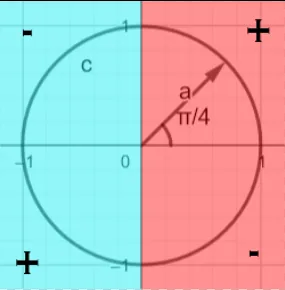
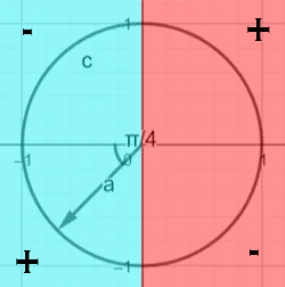
Passing both these vectors through $\tan^{-1}(x)$, gives you $\frac{\pi}{4} = 45^\circ$
This is one way of looking at $\tan^{-1}(x)$, but here’s a different approach. We’ll make use of the fact that vectors don’t have a starting point.
We can “move” a vector in our imagination from something like this.
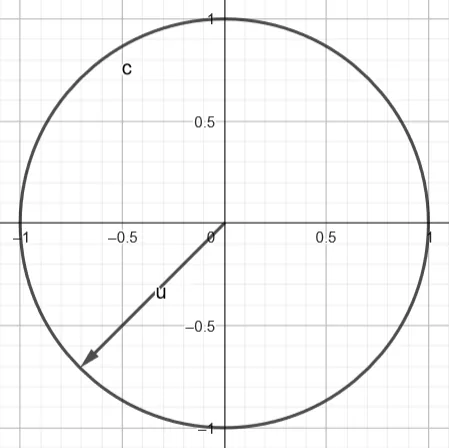
To something like this:
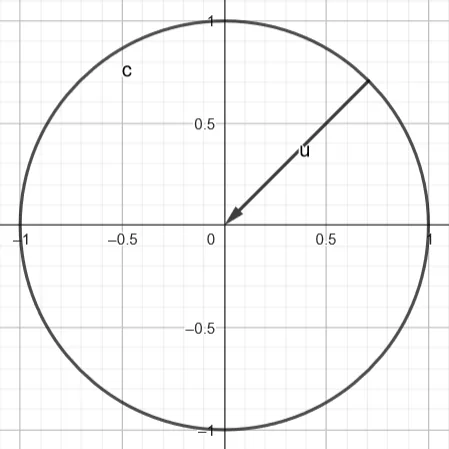
We can then ignore everything on the left side,
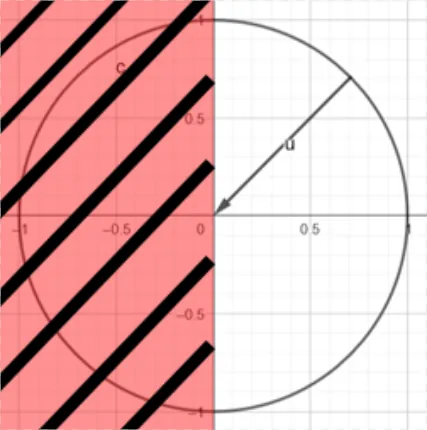
Even if the vector is pointed in the other way around, by doing this we can find the angle with respect to the +x axis, which is still $\frac{\pi}{4} = 45^\circ$
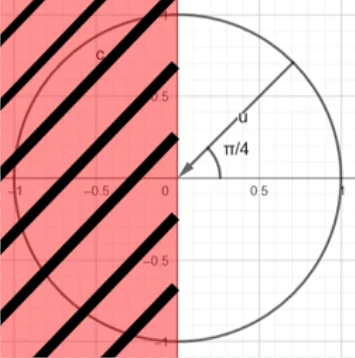
This is insanity! How do we mathematically obtain the angle - the vector makes from the +x axis? Well~ technically you can’t, I will explain why in the next chapter.
So how do we get the angle? Well, now we use logic.
Let us dive deep into making sense of mathematical facts, using logic by defining our own ways of classifying vectors.
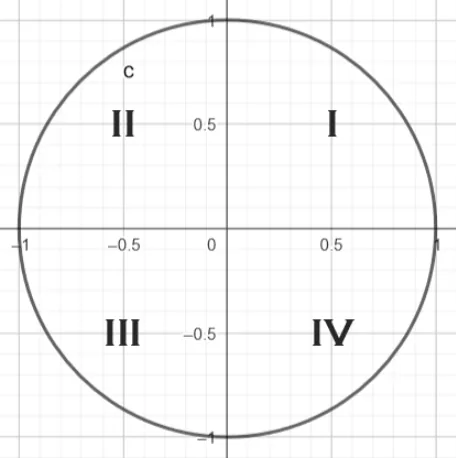
In this scenario and orientation, the vertical component is represented by the Y-axis, and the horizontal component is represented by the X-axis. I will be using them interchangeably in this example.
Let’s take an example vector v, and let’s define our set of rules/protocols.
If the y component of v is +ve, and the x component of v is +ve, let’s consider the vector v to be in the 1st quadrant.
If the y component of v is +ve, and the x component of v is -ve, let’s consider the vector v to be in the 2nd quadrant.
If the y component of v is -ve, and the x component of v is -ve, let’s consider the vector v to be in the 3rd quadrant.
If the y component of v is -ve, and the x component of v is +ve, let’s consider the vector v to be in the 4rd quadrant.
Now, Let $\delta$ be some number.
Using these 4 rules, above, we can formulate a few other definitions.
If the vector is in the 1st Quadrant and 4th Quadrant, let $\delta = 0^\circ or 0\text{(in radians)}$. If the vector is in the 2nd Quadrant and 3rd Quadrant, let $\delta = 180^\circ or \pi$.
We can now define the angle from +x axis to be $\delta + \tan^{-1}(x)$.
We can now make some deductions:
In the 1st Quadrant, the degrees will always be from $0^\circ \to 90^\circ$, as $\delta = 0^\circ$, and $\tan^{-1}(x)$ has a range of $[-90^\circ, 90^\circ]$, and in this instance, we only see $[0, 90^\circ]$
- $\delta + \tan^{-1}(x)$ has a range of $[0^\circ, 90^\circ]$ {in the 1st Quadrant}
In the 2nd Quadrant, the degrees will always be from $90^\circ \to 180^\circ$, as $\delta = 180^\circ$, and $\tan^{-1}(x)$ has a range of $[-90^\circ, 90^\circ]$, and in this instance, we only see $[-90^\circ, 0^\circ]$
- $\delta + \tan^{-1}(x)$ has a range of $[90^\circ, 180^\circ]$ {in the 2nd Quadrant}
In the 3rd Quadrant, the degrees will always be from $180^\circ \to 270^\circ$, as $\delta = 180^\circ$, and $\tan^{-1}(x)$ has a range of $[-90^\circ, 90^\circ]$, and in this instance, we only see $[0^\circ, 90^\circ]$
- $\delta + \tan^{-1}(x)$ has a range of $[180^\circ, 270^\circ]$ {in the 3rd Quadrant}
In the 4th Quadrant, the degrees will always be from $-90^\circ \to 0^\circ$, as $\delta = 0^\circ$, and $\tan^{-1}(x)$ has a range of $[-90^\circ, 90^\circ]$, and in this instance, we only see $[-90^\circ, 0^\circ]$
- $\delta + \tan^{-1}(x)$ has a range of $[-90^\circ, 0^\circ]$ {in the 4th Quadrant}
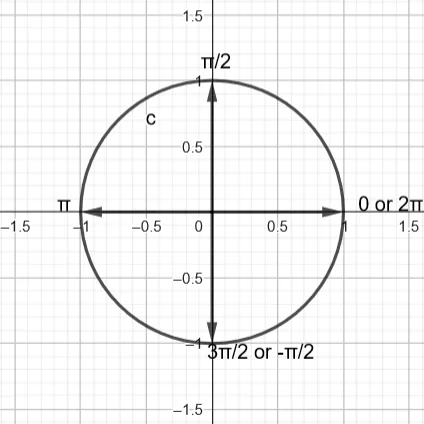
We see a sudden shift after $270^\circ \to -90^\circ$, as $0^\circ$ can be taken as $360^\circ$, technically they both are the same. In fact we can take $\text{(any number)} \times 360^\circ = 0^\circ$. So $-90^\circ$ is literally $360^\circ - 90^\circ$, which is $= 270^\circ$
It’s just the same thing, but viewed in a different way.
Absoluteness, Relativeness, Math, Philosophy
Math in its raw state doesn’t really give absolute answers. Think about it! It gives us functions like +, -, /, *, etc which work on other objects!
If you think the coordinate system we have been dealing with is absolute, well rethink again! We always talked about unit circles, unit vectors. What is a unit? Math just says, ‘unit’ is “1”. Well ‘1’ what? ‘1’ meter? ‘1’ Kilometer? It depends on what you want it to be! Where is the $(0, 0)$ on a coordinate plane located? Is it physically in India? Is it located at the center of Earth? Is it located at the center of the universe? Nope. Is it located in your imagination? Well sort of. It’s just an imaginary relative coordinate system. If you want, the place you are standing/sitting in right now can also be taken as $(0, 0)$. Anywhere can be taken as $(0, 0)$.
That’s what math is all about! This is what I introduced in the last section of the previous chapter. Well, if math gives us relative answers, then how do we convert it to something physical? How do we make absolute sense of something that’s relative? Well that’s where logic comes into play. I gave a small hint of this in the previous chapter by defining our own set of rules, and then making sense of it.
I will give you a physical example of such an effect. In outer space, there is no UP, DOWN, SIDE, etc. Everything is in relation to some reference point. Here’s a thought experiment, imagine yourself in an empty void, there’s nothing around you, no stars in the sky, nothing. Well in that scenario, what is “UP”? What is “DOWN”?
We can define a reference point to our eyes, and say, anything that’s visible to me in the top horizon of my eyes, I will call that the “UP” direction and vice versa. On earth, the reference point is taken as the direction of gravity. The direction of gravity dictates where “DOWN” is. “UP” is opposite of “DOWN”.
“NORTH”/”SOUTH”/”EAST”/”WEST” face a similar problem.
We as a human society have agreed upon certain protocols, such as “NORTH” is the direction where a magnetic compass points towards. “EAST” is the direction where the sun rises.
Other directions like “south”/”west” can be derived from these 2 rules, we as a human society follow.
Setting such rules, and following them can help us go from a relative truth to an absolute truth.
Here’s an example of how I use this concept in my project.
The Left hand X-Y-Z axis system, where I set “Z” as the “UP” vector, “Y” as the “FORWARD” vector, and “X” as the “RIGHT” vector.
On my 2D computer screen, I can then program saying, if anything has a higher “Z” component in it, in relation to the camera’s position, draw that particular pixel on the top portion of the screen, and vice versa. This similar reasoning goes for left and right as well.
If I hadn’t set down and followed a particular set of rules, my project would have never worked.
I believe this “absoluteness” is an emergent property of following certain protocols. Similar emergent properties can be observed in nature all around us. All particles individually follow a set of laws since the birth of the universe, and here we are, a universe filled with wonder, life, cosmic beauty, and whatnot! It’s the physicists job to figure out what this “universal law” is!
Camera Projections
Finally! We are done with the basic math. There’s a bit more math, but we can do that on the way. Let’s get into the basics of ray tracing!
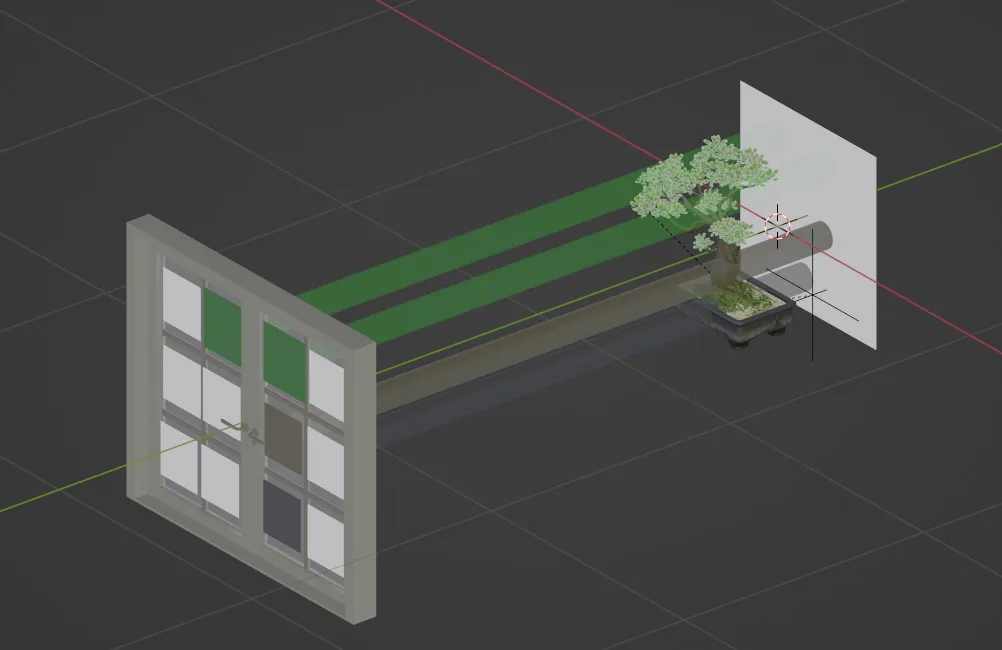
In the real world, the sun shines brightly in all directions. Some of its light reaches some objects, of which only some reflect off the object and reach our eyes. Now if we want a realistic looking render using the laws of physics, we can’t calculate infinite rays and bounces. Instead what we can do is, send a ray from each “pixel” and whenever that ray intersects with some object, we bounce it towards all light sources in the scene, and according to the brightness amount, we set the pixel’s color, which shot the ray, to the color of the object it has intersected * brightness_percent.
Pixels are shown as a checkered window in the given illustration.
How do we do this now?
Well, we know something about vectors, so let’s try to use those formulae. Let’s call a camera an object which has a few properties like position in 3D space, and the direction in which it points towards.
Remember, directional vectors are always normalized!
Now, for each pixel on the .png render image, we shift our camera origin by the pixel coordinate on the 2D screen, and we then cast a ray in the direction of the camera’s directional vector.
These are the types of Objects implemented in my system:
enum ObjectType {
    Sphere_,
    PointLightning_,
    Camera_,
    NONE
}
This is how a general object looks in code:
class Object3D{
public:
    int id;
    Vector origin;
    Vector normal;
    ObjectType type;
    // ...
}
This is how the camera looks in code. The camera inherits all properties of Object3D.
class Camera : public Object3D {
public:
    unsigned int height, width;
    float max_clip, min_clip;
    // other hidden properties for now
    // ...
}
This works fine, until you realize the objects in the render don’t scale when you move closer to the object. “What do you mean?”, you ask. Well, here’s a simulation of what we are trying to do.

The top right view shows us the view of the camera we just implemented (imagine the window to be the camera). It is completely static, even if we move the object further/closer towards the window (camera).
Looking at this diagram, it sort of makes sense. The rectangular viewport remains the same size throughout the depth which the camera can view. I.e The rectangular view doesn’t change size, the object remains the same size in relation to its surrounding (cylinders) when we move it closer/further from the camera.
After a bit of wikipedia surfing, I realized this is its own kind of projection called an “Orthographic projection”. Its main property is that, the light rays are parallel to each other (which is what we made, “each pixel shoots off its own ray in the direction of the camera’s normal”), causing the distance of the object to feel as if it were at , and therefore, the size of the image of the object isn’t affected even if we move the object physically closer to the camera.
The type of projection we are looking for is called “Perspective projection”, where the objects are scaled according to their distance from the camera.
And for this, we need to make sure that the rays produced from the camera are not parallel to each other, but instead have a slight angular deviation, to sort of form a cone shaped viewport.
Here is an illustration of what that might look like.

However, at one end of the cone, it meets at a single point. Then what’s the point of the window? Well we still need the window to see what pixel is going to be colored. The end point of the cone can be called the camera’s origin, and the distance from the origin to the pixel window can be called the focal distance.
Now, all we need to do is calculate the right/front/up (x/y/z) from the camera’s normal vector (if we take the normal of the camera to point “forwards”). We’ll save these 3 vectors in a variable inside the camera object itself, and call it “orthogonals” Remember, as we only have 1 vector to figure out the orthogonals, we only have 2 degrees of rotation (i.e up/down, left/right, we can’t roll our view)
Here are the calculations for figuring out the x/y/z components in relation to the camera’s normal vector:
// this = camera instance
this->orthogonals[0] = Vector(normal_.y, -this->normal.x, 0).normalize();
this->orthogonals[1] = normal_;
this->orthogonals[2] = (this->orthogonals[0].cross(normal_)).normalize();
It’s a tiny bit complicated to understand, don’t worry too much
Here’s the final version of how our camera object looks like:
class Camera : public Object3D {
public:
    unsigned int height, width;
    float max_clip, min_clip;
    int focal_length;
    Vector orthogonals[3];
    // ...
}
Using these orthogonals, we can easily figure out the shift in the pixel coordinate on a 2D screen, convert those to a vector, then add it up with focal_length * orthogonal.forward, to get the total deviation direction from the point sized camera in terms of a vector.
// this = camera instance
(this->orthogonals[1] * this->focal_length*2) + (this->orthogonals[0] * dx) + (this->orthogonals[2] * dz)
Where, dx and dz are defined as:
for (unsigned int x = 0; x < this->width; x++)
    for (unsigned int z = 0; z < this->height; z++) {
        int dx = x - this->width/2;
        int dz = z - this->height/2;
        // ...
    }
dx gives the deviation in the horizontal component of our viewport (not the 3D environment) per pixel dz gives the deviation in the vertical component of our viewport (not the 3D environment) per pixel
We can now easily calculate interactions with objects using this mathematical ‘Light ray’.
Shooting Light Rays
Just a single vector cannot help us detect if we have intersected with an object. That’s because vectors are not physically connected to any points. They just convey magnitude (i.e some number), and direction. If we need to shoot “rays” from each pixel, we need to set its starting point at the camera’s origin, but as we just confirmed, vectors aren’t enough for that.
What if I create an object which contains a “starting point” (which can be represented by a vector), and then also make it contain the “directional vector”?? So we can imagine a ray which starts from the starting position, and then shoots off, into the direction which is parallel to the directional vector.
12th Grade NCERT Textbook gives us a really good theory backend for that kind of an object.
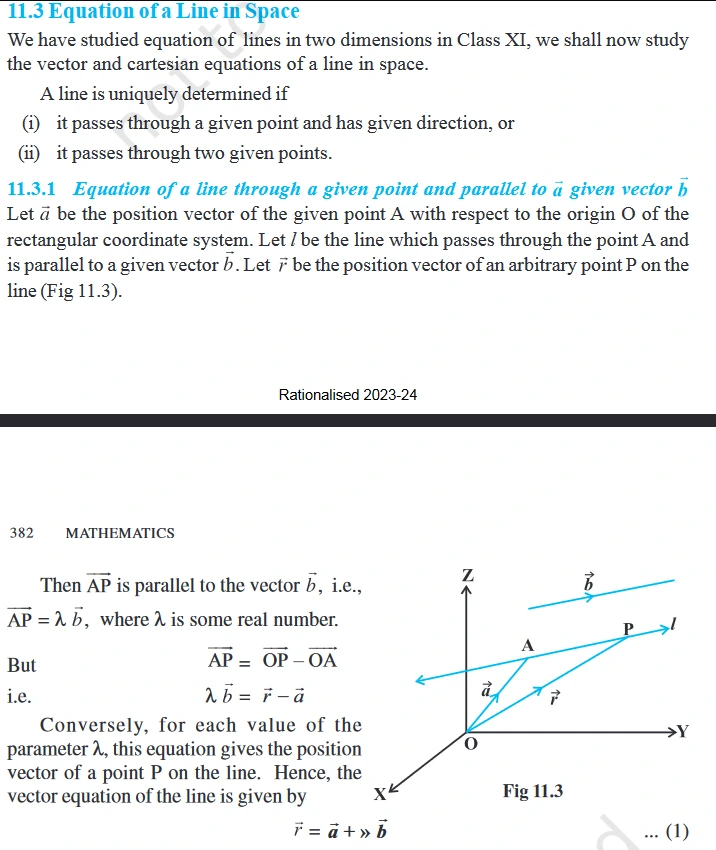
As we can see, mathematicians are already far more ahead of us. It’s alright, we can use their work to build our systems. That’s literally what engineers do!
Given in the extract, we see the way to represent a line in 3D geometry is using the mathematical notation of $\vec{r} = \vec{a} + »\vec{b}$, where a is a point vector, and b is the directional vector.
Directional vectors are only used to specify the direction, and are hence normalized when initializing them, although it isn’t necessary, we just normalize it for the convention.
In that equation, a term and b term, cannot be added just like that, they represent 2 different quantities, and hence in code we can write something like this
class Line{
public:
    Vector origin;
    Vector dir;
    // ...
}
We represent any point’s position on the line using this notation: $r = a + \lambda b$, where r is the point vector to a ‘general point’ on the line, a is the ‘starting position’, λ is any number(when a number is substituted for $\lambda$, it gives us a point on the line), and b is the ‘direction vector’.
On a 2D line, we can define the same formula in terms of $y = mx + c$, where (y ~ r), (m ~ b), (x ~ λ), (c ~ a) respectively, but those points are 1 dimensional. $r = a + \lambda b$, the general point on a line formula, looks something like this if we take a as $(0, 0, 1)$, and b to be $(0, 1, 0)$, and if we animate λ to go from -5 to +5.

Recalling 6th and 7th grade geometry class, we know Line is not a Ray. The main difference is, “Line” extends in both directions to infinity, whereas Ray has a starting point, and only extends in one direction. Then how can I call the ‘starting point’ in my code, the ‘origin point’? What even is ‘origin’, on an infinite line?
Well, I can trick the computer to ignore all calculations which are “behind” the origin point, i.e in the direction of -camera.direction (remember, -ve of a vector turns it 180°), and so we technically get a ray, by just using lines.
Impact
Now that we can shoot a Ray from a camera position, how do we find out about the ray hitting an object?
To start off, let’s take the simplest 3D shape, a Sphere. It’s a simple shape as it has the same distance from the center/origin on the sphere to any point on the given sphere. And also rotation of a sphere doesn’t really change anything about the sphere model itself, and I don’t really want to deal with rotation of other complex 3D objects.
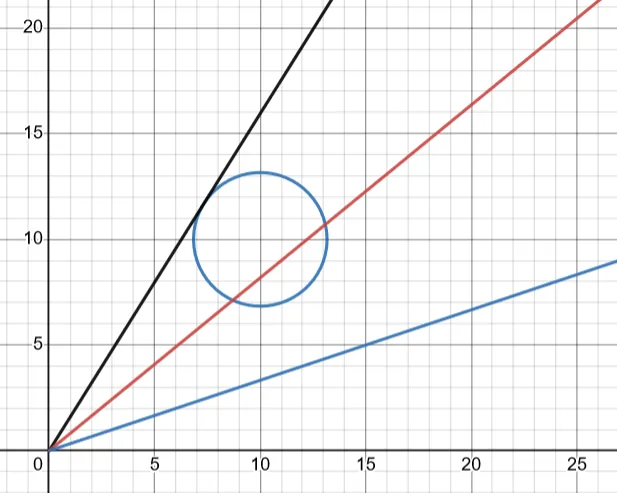
We can define 3 Cases of what happens when a ray intersects a 3D sphere. Here, I will just draw out the 3 scenarios on a 2D plane, please try and visualize this on a 3D scale. The camera is assumed to be at $(0, 0)$
-
Case 1 (Blue line): The line doesn’t intersect the object.
-
Case 2 (Black line): The line is tangential to the sphere. I.e It only intersects the sphere at a single point. (Very rare)
-
Case 3 (Red line): The line intersects with the sphere at 2 points.
In this devlog, we will ignore the alpha channel of color. We won’t be considering transparency as that makes color combinations unnecessarily complex.
We can imagine the intersection to work something like this on a 2D plane:

Deriving a function which shows when a ‘Ray’ intersects a Sphere, gives a few equation.
12th grade NCERT textbook also gives us this set of rules. I couldn’t find this anywhere in my math textbook, but I do remember my math teacher teaching us this topic
Solving these equations manually and converting them to code, gives us this:
// this => sphere instance
double mu = pow(line.dir.x 2) + pow(line.dir.y, 2) + pow(line.dir.z, 2);

std::vector<ResultIntersection> ret_list;
if (mu == 0) return ret_list; // handle edge case

double lambda = -(
    line.dir.x * (line.origin.x - this->origin.x) +
    line.dir.y * (line.origin.y - this->origin.y) +
    line.dir.z * (line.origin.z - this->origin.z)
)/mu;

// point on line where the ray is closest to the sphere(from world origin)
Vector point = Vector(
    line.origin.x + line.dir.x*lambda,
    line.origin.y + line.dir.y*lambda,
    line.origin.z + line.dir.z*lambda
);
double dist = (point - this->origin).magnitude(); // dist b/w point on line to the center of sphere
As seen from the code, we are going to calculate the distance between a point on the line, and the center of our sphere. The said point on the line is closest to the sphere’s origin point, and as such, it draws a perpendicular line from the line, to the center of the sphere, always.
When we draw this out, we see something like this: There are 2 Cases: (The drawing is in 2D, but imagine it in 3D instead)
- Case 1, Line doesn’t intersect the sphere
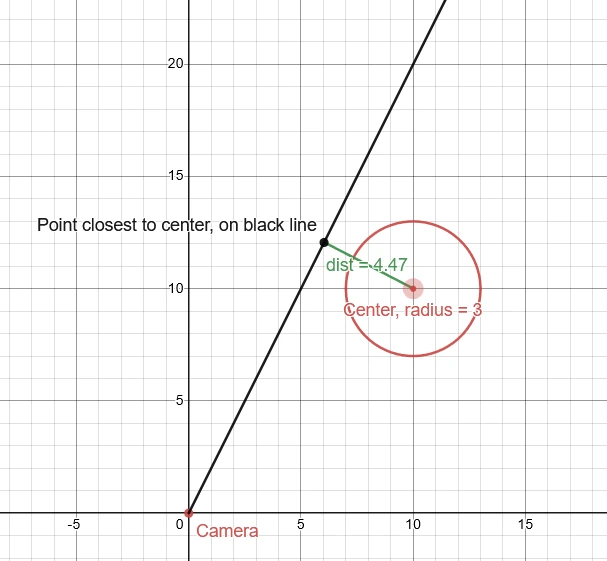
- Case 2, The line intersects the sphere:
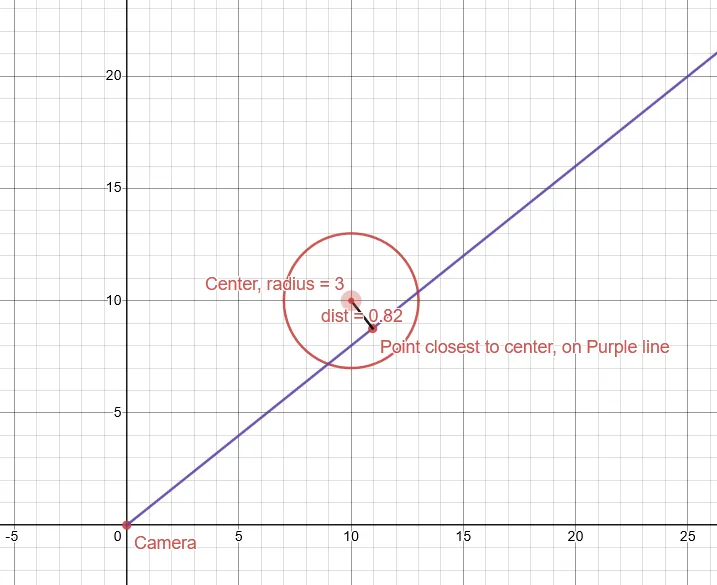
When we draw it out, we see some relation between the (distance between the center point on the sphere and the closest point on the line) and (if the line intersects the sphere or not)
If the distance is lesser than or equal to the radius of the sphere, we can say that the line is intersecting with the sphere (as in Case2, and vice versa).
This little derivation I found out, was probably the one which boosted my way into learning more about ray-tracing, as until this point this was just another “Hobby project” of mine.
Before we get too much into the theory, let’s analyze the Sphere Object in code.
class Sphere : public Object3D {
public:
    Color color;
    double radius;
    // ...
}
The sphere too derives components from “Object3D”, similar to the “Camera” Object, and hence it holds members which dictates its position, and its rotation. Let’s forget rotation for now, as rotating a single colored sphere has no meaning.
Now, when a ray intersects with the sphere, we can return back the color of the sphere. Otherwise, let the function essentially return a “false”, which represents it hasn’t intersected with any object. Then the camera can just fill those pixels with the color of the background
whatever color you want! Or If you want, you can create a variable for that too, and expose it to the end user.
We run this “intersection” function from each ray, for all the visible 3D objects in the scene
We are omitting cameras, and pointlights, we’ll consider those objects to be invisible.
Hence this function gets called at least (num-of-rays * total-spheres) times. This is how that looks if the color was set to R255 G255 B255
RGB/Red Green Blue is 3 Bytes long, one byte is 0-255 in length, lesser the number (i.e towards 0), more darker is the color, higher the number (i.e towards 255), more lighter is the color. Hence RGB of 255, 255, 255 is plain white.
Setting up an example scene takes a few seconds to visualize the camera, sphere, and other objects in a 3D environment. If it may be hard to visualize, try out the Geogebra 3D calculator to map out the locations of components in your scene. This part is also mostly about trial and error, choosing the right coordinates, the right radius, etc. Take your time, and re-roll your numbers!
By the end, we end up with something that looks like this.
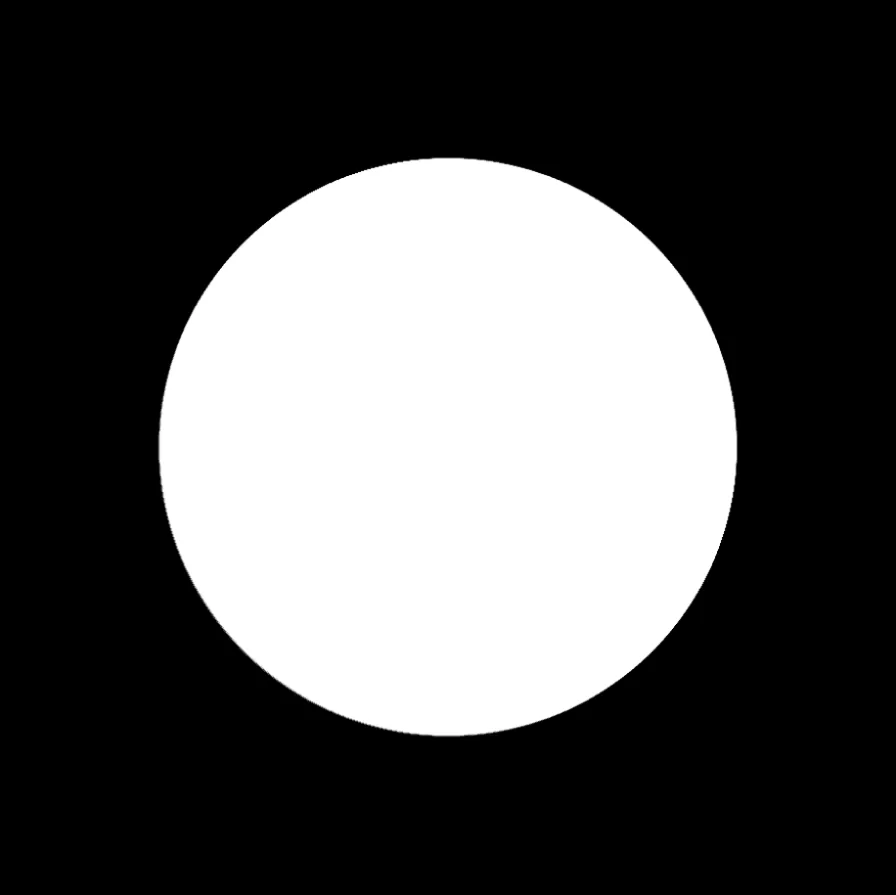
Voila! We have a sphere! Well it looks more like a 2D circle than a 3D sphere. That’s because we haven’t implemented Lighting yet. Lighting does most of the heavy lifting for us, and gives objects dark spots, shadows, and really helps bring out the shape of the object.
Read Part 2 Here
If there are any changes required in this post, please contact me at skandabhairava@gmail.com with the necessary information.Enjoy Reading This Article?
Here are some more articles you might like to read next: