Parallelism | Part 1
Parallelism[1] is the concept of working on multiple tasks simultaneously. This concept is well known. For example, we work on our project, while also thinking about what to cook for dinner, we achieve 2 tasks simultaneously – the act of thinking, and working on a project. Parallelism in Computer Systems is similar, but there are a lot of variations to this concept.
Parallelism can be categorized under various types, we shall look at 3 main ways of classifying it:
[<a id=main>Parallelism & Concurrency]
[<table id=conc>Execution Parallelism|Multi-threading||Multi-processing||Asynchronous;programming]
[<table id=para>Parallelism by Level|Data;Parallelism||Task;Parallelism||Instruction-Level;Parallelism]
[<table id=hard>Hardware/;Execution Models|SISD||SIMD||MISD||MIMD]
[<a id=main>]->[<table id=conc>]
[<a id=main>]->[<table id=para>]
[<a id=main>]->[<table id=hard>]
We will mainly go through Execution Parallelism in this part.
Execution Parallelism
This is how parallelism is categorized based on how it is achieved using different execution mechanism.
The actual execution of tasks can be Truely-parallel, or concurrent. Parallelism is the ability of tasks to run in parallel in the same instant of time, whereas Concurrency is the ability where multiple tasks can make progress during overlapping periods of time[2]. Using the project-dinner-cooking example mentioned previously, our concentration can be considered as being run concurrently, as we can only focus on ONE task (either thinking of adding more salt to our stew, or fixing that one bug in the project/code) at a time.
How, When and Where these tasks run (either parallel or concurrent), depends on the hardware type (Single Core, Multi Core, GPUs, etc), the scheduling algorithm used, when context shifts occur, etc.
What is context switch, job scheduling, etc? If multiple jobs are scheduled to run concurrently, they need to be scheduled, so they appear to run parallel to the users. If a job takes a lot of time to execute (which most jobs do), we don’t want other processes waiting, hence we preempt (similar to pausing) the running task, and switch the (execution) context to another process[3]. There are other scheduling algorithms which do not preempt running tasks. Some interesting scheduling algorithms are First Come First Serve (FCFS), Round Robin, Priority Scheduling, Shortest Remaining Time (SRT)[3].
#direction: right
[<start id=a>start] -> [<reference id=t1>task 1] -> [<reference id=t2>task 2] -> [<reference id=t3>task 1] -> [<reference id=t4>task 2] --> [<end id=b>]
The above chart is an example of concurrency on a single execution hardware (like a single-core processor), following a scheduling algorithm similar to Round Robin. It executes a task for a time_quantum period of time, and then preempts (i.e similar to pausing) it, and switches context to another task. After all tasks are exhausted in the pool, we restart from the first task, and so on, untill the tasks are completed.
Of course, the above graph just shows how time slicing works, etc. Actual implementation of scheduling algorithms are more complicated
#direction: right
[<start id=a>start] -> [task 1] -> [<end id=b>]
[<start id=a>start] -> [task 2] -> [<end id=b>]
The above chart is an example of true parallelism, where multiple tasks are run in parallel at the same time, usually by utilising multiple hardware components, like multiple CPU Cores.
Reminder: Multi-threading and Multi-processing CAN run concurrently on a single cpu core, or parallely on multiple cores. However, that depends on how many cores your hardware contains, how the job scheduler on your OS decides to schedule the tasks, etc. However, the concept of Asynchronous programming is ALWAYS ran sequentially.
Each type of execution prallelism model has its own advantages and disadvantages, and they should be selected for the right size (i.e how Coarse/Granulated the task is) of the task that needs to be parallelized.
Multi-processing
- Task size: Coarse
Multi-processing and its scheduling is taken care, and managed by your Operating System. Most of the time, the apps you open/run on your computer is mostl likely a process, such as when you open Chrome, Calculator, CMD, etc; most bash command you run on linux, is its own process such as ls, grep, vim, etc.
Technically, each process can have multiple child processes under it. Some bash commands like cd, alias, etc are implemented inside bash, and aren’t run as separate processes.
Each process is a program that is in execution, along with the resources and OS-managed info that is associated with that execution. Each process can have one or more threads inside it. These threads are the actual units of execution[4].
These processes typically contain things like[5]:
- Thread(s)
- Address Space (Code, Data, Heap, etc)
- Process Metadata (PID, state, scheduling info, etc)
- OS managed resource (Files open, Permissions, etc)
More information about multi-processing:
- Processes can easily run on multiple cores parallely, as their address spaces, and managed resources are separate from each other.
- They are usually heavy (i.e require more resources like time/storage) to create, as each process contain a lot of info other than the execution states itself.
- Processes have separate address spaces, and hence they can’t directly communicate with each other directly. They need an IPC (Inter process communication, usually a separate external managed resource) mechanism, like a pipes, queues, sockets, or shared memory to communicate.
#gutter: 1
#spacing: 67
[Process 1|
  [<table>Info|
    Address Space: | Code | Data | Heap||
    Metadata: | PID | State | Scheduling||
    OS Resources: | Files Open | Permissions | Sockets
  ]|
  [<start>start1] -> [<end>end1]
  [<start>start2] -> [<end>end2]
  [<start>start3] -> [<end>end3]
  [<start>start4] -> [<end>end4]
  [<start>start5] -> [<end>end5]
  [<start>start6] -> [<end>end6]
]

[Process 2|
  [<table>Info|
    Address Space: | Code | Data | Heap||
    Metadata: | PID | State | Scheduling||
    OS Resources: | Files Open | Permissions | Sockets
  ]|
  [<start>start1] -> [<end>end1]
  [<start>start2] -> [<end>end2]
  [<start>start3] -> [<end>end3]
  [<start>start4] -> [<end>end4]
  [<start>start5] -> [<end>end5]
  [<start>start6] -> [<end>end6]
]
Here’s a simple implementation of multiprocessing in Python.
Show code
Code:
from multiprocessing import Process
import os

def whoami():
    print(f"i am: {os.getpid()} | {__name__}")

total_procs = 2

def main():
    procs = [
        Process(target=whoami)
        for i in range(total_procs)
    ]

    # start procs
    [p.start() for p in procs]

    # join procs
    [p.join() for p in procs]

if __name__ == "__main__":
    # This is needed because,
    #   multiproc starts a new process by running this code from the start.
    # That would recursively start new processes.
    # The first process would have its __name__ set to "__main__", other sub-processes created have different __name__
    # This stops the process from recursively starting new processes.
    main()
The above code spins up 2 processes, each of which internally calls an OS function to get its own PID, and prints it. PID is essentially the Process ID, which is a unique identification number assigned to processes by the OS.
Result:
i am: 197976 | __mp_main__
i am: 197977 | __mp_main__
The result shows that, the 2 processes have different PIDs, and are hence are treated as 2 unique processes by the OS.
Here’s an example of processes trying to communicate using a ‘common’ variable in Python.
Show code
Code:
from multiprocessing import Process
import time

grand_total = 0

def add_one():
    global grand_total

    for num in range(10_000_000):
        grand_total += 1

def main():
    total_procs = 10
    procs = [
        Process(target=add_one)
        for _ in range(total_procs)
    ]

    start = time.time()
    # start threads
    [p.start() for p in procs]

    # join threads
    [p.join() for p in procs]
    end = time.time()

    print(f"time taken: {end - start}")
    print(f"addition: {grand_total}")

if __name__ == "__main__":
    main()
The above code spins up 10 processes, each of which tries to add 10,000,000 (10 Million, by adding 1 at a time) to a variable called grand_total.
Result:
time taken: 1.5167770385742188
addition: 0
The result of addition is 0, as the processes technicaly do not have a ‘common’ variable. They have their own set of variables which they update. Hence the main process’s variable remains stale.
The grand_total in each process looks like this after the job is complete:
| Procs | #1 | #2 | … | Main Proc |
| grand_total | 10 Mil | 10 Mil | … | 0 |
To fix this, we can use a communication channel, such as the one provided by Python’s multiprocessing libraries. IPC (Inter-process communication) mechanisms are provided by your runtime and OS, to help communicate between various processes. They are used to send/recieve messages from processes.
Show code
Code:
from multiprocessing import Process, Value
import time

def add_one(grand_total):
    total = 0
    for num in range(1_000_000):
        total += 1

    with grand_total.get_lock():
        grand_total.value += total

def main():
    grand_total = Value('i', 0)

    total_procs = 100
    procs = [
        Process(
            target=add_one,
            args=(grand_total,)
        )
        for _ in range(total_procs)
    ]

    start = time.time()
    # start threads
    [p.start() for p in procs]

    # join threads
    [p.join() for p in procs]
    end = time.time()

    print(f"time taken: {end - start}")
    print(f"addition: {grand_total.value}")

if __name__ == "__main__":
    main()
The above code uses the Value channel to help communicate a certain value (here, grand_total) between the different processes.
Technically, Value is implemented as a shared memory object under the hood, which supports synchronization methods. Its implemented directly in C.
Result:
time taken: 0.7432212829589844
addition: 100000000
We see, the result shows the correct answer of 100 Million (1 Million additions per proc * 100 Processes).
Multi-processing shines bright, when we detatch it from a single core. We can force schedule multiple processes to run on different cores, so they are run in parallel (instead of running them concurrently). This increases the performance immensely. We can observe, how performant a Multi-Core CPU is to a Single-Core CPU.
Here is a Bash command to basically do nothing for a long time. All it does is, it takes up CPU resources.
awk 'BEGIN{for(i=0;i<1000000000;i++){}}'
If we force run 2 instances of the awk process, on only 1 CPU by doing:
taskset -c 1 perf stat awk 'BEGIN{for(i=0;i<1000000000;i++){}}' |\
 taskset -c 1 perf stat awk 'BEGIN{for(i=0;i<1000000000;i++){}}'
We can see the CPU 1, take up all of the load by the awk process.
$ mpstat -P ALL 1 1 2>/dev/null | \
 awk '$2 ~ /^[0-9]+$/ {printf "CPU %d: %.1f%%\n", $2, 100-$NF}'
CPU 0: 1.0%
CPU 1: 100.0%
CPU 2: 1.0%
CPU 3: 0.0%
CPU 4: 0.0%
CPU 5: 0.0%
CPU 6: 3.0%
CPU 7: 1.0%
The output at the end of the run shows:
Performance counter stats for 'awk BEGIN{for(i=0;i<1000000000;i++){}}':

      70.256938903 seconds time elapsed

      31.989712000 seconds user
       0.065920000 seconds sys

Performance counter stats for 'awk BEGIN{for(i=0;i<1000000000;i++){}}':

      70.291389282 seconds time elapsed

      32.000188000 seconds user
       0.081993000 seconds sys
So, each task takes around 32s, while both the tasks running concurrently on a single core CPU takes 70ish seconds. The extra time (70 - 2*32s = 6s) is due to other processes also running on that core, and context switching.
Now, if we force run 2 instances of the awk process on 2 CPU cores by doing:
taskset -c 0 perf stat awk 'BEGIN{for(i=0;i<1000000000;i++){}}' | \
 taskset -c 1 perf stat awk 'BEGIN{for(i=0;i<1000000000;i++){}}'
We can see the CPU cores 0 and 1, take up all of the load by the awk process.
$ mpstat -P ALL 1 1 2>/dev/null | \
 awk '$2 ~ /^[0-9]+$/ {printf "CPU %d: %.1f%%\n", $2, 100-$NF}'
CPU 0: 100.0%
CPU 1: 100.0%
CPU 2: 1.0%
CPU 3: 0.0%
CPU 4: 0.0%
CPU 5: 2.0%
CPU 6: 0.0%
CPU 7: 0.0%
The output at the end of the run shows:
Performance counter stats for 'awk BEGIN{for(i=0;i<1000000000;i++){}}':

      32.756769306 seconds time elapsed

      32.542555000 seconds user
       0.002913000 seconds sys

Performance counter stats for 'awk BEGIN{for(i=0;i<1000000000;i++){}}':

      33.065350392 seconds time elapsed

      32.854813000 seconds user
       0.001961000 seconds sys
Once again, each task takes around 32s, and both tasks together take around 33s, which is around half the time as the original test when we ran the same 2 tasks on just a single core. This is because, here, in a multi-core setup, each core runs parallely in real-time, and there’s little to no context switches that occur.
Multi-threading
- Task size: Less Coarse
Each process starts off with one main thread. A Thread contains certain execution state information such as program counter, stack pointer, thread state, scheduling related info, etc.
We can “run” more tasks parallely under the same process, by adding more threads to the process. Each thread can access each other’s memory, as they are executing in the same process, this makes communication between threads faster and easier.
More information about multi-threading[6]:
- They are lighter than processes to create, as each thread only contain info of its own execution states.
- Threads can directly communicate with each other easily as its memory space is shared.
Here’s a simple implementation of multithreading in Python.
Show code
Code:
import threading
import os

def whoami():
    print(f"i am: {os.getpid()} | {__name__}")

total_threads = 2
threads = [
    threading.Thread(target=whoami)
    for i in range(total_threads)
]

# start threads
[t.start() for t in threads]

# join threads
[t.join() for t in threads]

# we do not need __name__ == "__main__",
# as no new processes are getting created
# and the program isn't run from the very beginning for each thread
The above code schedules 2 threads, each of which calls an OS function to get its PID, and prints it to the console.
Result:
i am: 203550 | __main__
i am: 203550 | __main__
The result shows that both threads print the same PID, and hence are run under the same process by the OS.
The execution of this process looks like this:
#direction: right
[Process 1|
	[<start> s] -> [<hidden id=h1>] - [<label> t1.start()] -> [<a id=1> whoami]  - [<label> t1.join()] ->  [<hidden id=h2>] -> [<end>]
    [<hidden id=h1>] - [<label> t2.start()] -> [<a id=2> whoami] - [<label> t2.join()] -> [<hidden id=h2>]
]
Here’s how 2 threads can communicate in Python.
Show code
Code:
import threading
import time
import sys

print(f"GIL enabled? {sys._is_gil_enabled()}")

grand_total = 0

def add_one():
    global grand_total

    for i, num in enumerate(range(1_000_000)):
        grand_total += 1

total_threads = 100
threads = [
    threading.Thread(target=add_one)
    for _ in range(total_threads)
]

start = time.time()
# start threads
[t.start() for t in threads]

# join threads
[t.join() for t in threads]
end = time.time()

print(f"time taken: {end - start}")
print(f"addition: {grand_total}")
The above code spins up 100 threads, each of which tries to update the global variable grand_total.
Before I show the result, I need to explain a little bit about Python’s GIL. GIL is a python specific concept, called Global Interpreter Lock. It was used to keep python’s internal runtine/VM safe from Multi-threaded access of resources (i.e Race conditions, which we will read about later), hence CPU bound task threads, never actually ran in parallel. It is currently being removed by default in the new free-threaded versions of python (Python 3.13t+)[7]. You can read more about it here[8].
I ran this above code 3 times without changing the code on both GIL enabled and GIL disabled versions of python, and these are the results:
GIL Disabled Result 1:
GIL enabled? False
time taken: 17.295501470565796
addition: 1072630
GIL Disabled Result 2:
GIL enabled? False
time taken: 17.883615016937256
addition: 1253227
GIL Disabled Result 3:
GIL enabled? False
time taken: 18.38012981414795
addition: 1337933
GIL Enabled Result 1:
GIL enabled? True
time taken: 14.144479990005493
addition: 100000000
GIL Enabled Result 2:
GIL enabled? True
time taken: 13.68181824684143
addition: 100000000
GIL Enabled Result 3:
GIL enabled? True
time taken: 12.626901149749756
addition: 100000000
Why does GIL Disabled versions show different/non-deterministic results? This is due to Race Conditions, which occurs when 2 or more running tasks access/modify the same data without synchronizing when to read/update. The non-deterministic results are due to how/when the thread scheduler schedules the threads.
A simple code a += b can be represented as multiple separate instructions, here I have picked out 4 main events under the += code which happen in order:
GET aGET bADD a b => cSTORE a <= c
If the scheduler, schedules all 4 of these instructions to run together without separating them, like such:
#direction: right
[<start>start] -
[<hidden id=t1h1>] -
Thread 1
[<hidden id=t1h2>] -
[<hidden id=t1h3>] -
[<a id=t1.1>GET a, b] ->
[<a id=t1.3>ADD a b -> c] ->
[<a id=t1.4>STORE a <- c] ->
[<end>]

[<start>start] ->
[<a id=t2.1>GET a, b] ->
[<a id=t2.3>ADD a b -> c] ->
[<a id=t2.4>STORE a <- c] -
[<hidden id=t2h1>] -
Thread 2
[<hidden id=t2h2>] -
[<hidden id=t2h3>] -
[<end>]
In the diagram above, let these be the order of events:
global a = 0, b = 1- Thread 1: Reads
a= 0, Readsb= 1 - Thread 1: Executes
a + b= 0 + 1 = 1, and stores it inlocal c - Thread 1: Stores
c’s value, insideglobal a global a = 1, b = 1- Thread 2: Reads
a= 1, Readsb= 1 - Thread 2: Executes
a + b= 1 + 1 = 2, and stores it inlocal c - Thread 2: Stores
c’s value, insideglobal a global a = 2, b = 1
Hence, the final output is correct!
However, if the scheduler schedules each instruction to run separately, this might occur:
#direction: right
[<start>start] ->
[<a id=t1.1>GET a, b] -
[<hidden id=t1h1>] ->
[<a id=t1.3>ADD a b -> c] -
[<hidden id=t1h2>] ->
[<a id=t1.4>STORE a <- c] -
Thread 1
[<hidden id=t1h3>] ->
[<end>]

[<start>start] ->
Thread 2
[<a id=t2.1>GET a, b] -
[<hidden id=t2h1>] ->
[<a id=t2.3>ADD a b -> c] -
[<hidden id=t2h2>] ->
[<a id=t2.4>STORE a <- c] ->
[<end>]
In the diagram above, let these be the order of events:
global a = 0, b = 1- Thread 1: Reads
a= 0, Readsb= 1 - Thread 2: Reads
a= 0, Readsb= 1 - Thread 1: Executes
a + b= 0 + 1 = 1, and stores it inlocal c - Thread 2: Executes
a + b= 0 + 1 = 1, and stores it inlocal c - Thread 1: Stores
c’s value, insideglobal a global a = 1, b = 1- Thread 2: Stores
c’s value, insideglobal a global a = 1, b = 1
Therefore, the output was corrupted by multiple reads-write to the same data/memory. This is called a race condition. Which is why our addition in the result generated by the GIL disabled runs was non-deterministic.
Then why does the GIL enabled versions return the correct value? Should we trust GIL to make the += work as intended without any race conditions (i.e is the += instruction atomic under GIL)? Not really. Back in older versions of python, especially any version before python 3.10, shows the same race condition even while GIL is enabled.
Result:
3.9.25 (main, Oct 31 2025, 23:00:23)
[Clang 21.1.4 ]
time taken: 22.333576440811157
addition: 11871122? False
In those old versions, the GIL would allow python to context switch at any point in time, while executing the instructions. However, python 3.10 introduced a small optimization in the GIL[9], which stopped it from switching the context/executing thread whenever. The end of a loop, is now a potential point when a thread can switch, and hence the += operation MIGHT look like its atomic.
However, the GIL must not be trusted completely. The added optimizations can easily be removed, or changed in later versions. Hence such operations are never guaranteed to be atomic. We can easily prove that GIL isn’t to be trusted; The current optimizations also allow the point of when a function returns to be a potential point where threads can switch. Therefore, we can rewrite the above code by adding a small function that just returns 1, which gets added to the grand_total variable.
Show code
Code:
def one():
    return 1

def add_one():
    global grand_total

    for i, num in enumerate(range(1_000_000)):
        grand_total += one()
Running the above code with GIL Enabled, 3 times gives:
GIL Enabled Result 4:
GIL enabled? True
time taken: 29.698392391204834
addition: 8340328
GIL Enabled Result 5:
GIL enabled? True
time taken: 27.876639127731323
addition: 7455026
GIL Enabled Result 6:
GIL enabled? True
time taken: 25.26656699180603
addition: 8580310
You can read more about this here[10].
Hence, even with GIL enabled, complex operations MIGHT allow race conditions to occur.
To prevent race conditions, we should always use synchronization methods, such as locks/mutexes/etc, to synchronize the read and write instructions[11]. Locks like mutexes, monitors, etc allow a thread to enter a “Zone”, where ONLY 1 thread can do a certain operation.
For example, Imagine 3 threads, where 2 of them want to write into a single variable at the same time.
#direction: right
[<a id=g1> Global Variable]
[<start id=s1>] -> [<a id=t1.1> Task 1] -> [<a id=g1>] -> [<a id=t1.2> Task 1] -> [<end id=e1>]
[<start id=s2>] -> [<a id=t2.1> Task 2] -> [<a id=g1>] -> [<a id=t2.2> Task 2] -> [<end id=e2>]
[<start id=s3>] -> [<a id=t3.1> Task 3] - [<hidden id=h1>] - [<hidden id=2>] -> [<end id=e3>]
We can add a lock on the common variable, so that, if any thread wants to access it, it NEEDS to ‘lock’ the resource before writing into it. After aquiring said lock, the thread can make use of the resource. After it’s done, it needs to ensure that it releases the lock, so other threads can use the resource. If any other thread requires using the resource, and if the resource’s lock has already been aquired by another thread, then the thread needs to wait for other threads to release the lock (i.e complete using the resource), before attempting to aquire the lock.
The other thread, which doesn’t use the resource (common variable in this scenario), need not wait for the resource.
#direction: right
[<a id=g1> Global Variable]
[<a id=g2> Global Variable]
[<start id=s1>] -> [<a id=t1.1> Task 1] -> [<l id=l1.1> aquires lock] - [<a id=g1>] - [<l id=l1.2> releases lock] -> [<a id=t1.2> Task 1] -> [<end id=e1>]
[<start id=s2>] -> [<a id=t2.1> Task 2] - [<hidden id=h2.1>] - [<hidden id=h2.2>] -> [aquires lock] - [<a id=g2>] - [<l id=l2.2> releases lock] -> [<a id=t2.2> Task 2] -> [<end id=e2>]
[<start id=s3>] -> [<a id=t3.1> Task 3] - [<hidden id=h3.1>] - [<hidden id=3.2>] -> [<end id=e3>]
Yes, waiting to aquire a lock, takes more time. Hence we need to optimize our parallel code, for less synchronization between threads.
Here’s a way to use Locks in python to lock the global variable before we perform the read+write operation.
Show code
Code:
import threading
import time

grand_total = 0
lock = threading.Lock()

def add_one():
    global grand_total

    for i, num in enumerate(range(1_000_000)):
        with lock:
            grand_total += 1


total_threads = 100
threads = [
    threading.Thread(target=add_one)
    for _ in range(total_threads)
]

start = time.time()
# start threads
[t.start() for t in threads]

# join threads
[t.join() for t in threads]
end = time.time()

print(f"time taken: {end - start}")
print(f"addition: {grand_total}")
With locks, the thread execution looks like this:
#direction: right
[<start>start] ->
[<a id=t1.1>GET lock] -
[<a id=t1.12>a += b] -
[<a id=t1.13>RELEASE lock] -
[<hidden id=t1h1>] -
Thread 1
[<hidden id=t1h2>] -
[<hidden id=t1h3>] ->
[<a id=t1.2>GET lock] -
[<a id=t1.22>a += b] -
[<a id=t1.23>RELEASE lock] ->
[<end>]

[<start>start] -
[<hidden id=t2h1>] -
[<hidden id=t2h12>] -
Thread 2
[<hidden id=t2h13>] -
[<hidden id=t2h14>] ->
[<a id=t2.1>GET lock] -
[<a id=t2.12>a += b] -
[<a id=t2.13>RELEASE lock] -
[<hidden id=t2h2>] -
[<hidden id=t2h3>] -
[<hidden id=t2h5>] ->
[<end>]
Hence, the result shows this on 3 runs:
time taken: 79.2425549030304
addition: 100000000
time taken: 101.0211398601532
addition: 100000000
time taken: 107.01375341415405
addition: 100000000
You might notice, it now takes more time for the tasks to complete as predicted.
We can optimise this code further, by adding all the numbers to a local variable, and at the end, aquire the lock to the global variable and store it then. This reduces the number of times we synchronize between the threads.
Show code
Code:
import threading
import time

grand_total = 0
lock = threading.Lock()

def add_one():
    global grand_total

    total = 0
    for i, num in enumerate(range(1_000_000)):
        total += 1

    with lock:
        grand_total += total

total_threads = 100
threads = [
    threading.Thread(target=add_one)
    for _ in range(total_threads)
]

start = time.time()
# start threads
[t.start() for t in threads]

# join threads
[t.join() for t in threads]
end = time.time()

print(f"time taken: {end - start}")
print(f"addition: {grand_total}")
With locks and after optimizations, the thread execution looks like this:
#direction: right
[<start>start] -
[<hidden id=t1h1>] -
Thread 1
[<a id=t1.1> Add up to 10 Million; => store in total_thread1] -
[<hidden id=t1h3>] ->
[<a id=t1.2>GET lock;global total += total_thread1;RELEASE lock] -
[<hidden id=t1h4>] ->
[<end>]

[<start>start] -
[<hidden id=t2h1>] -
[<a id=t2.1> Add up to 10 Million; => store in total_thread2] -
[<hidden id=t2h3>] -
Thread 2
[<hidden id=t2h4>] ->
[<a id=t2.2>GET lock;global total += total_thread2;RELEASE lock] ->
[<end>]
As we can see, we can achieve parallelism on the actual adding-to-10-million task, and only synchronize while sharing/communicating with other threads.
The results show:
time taken: 1.3640799522399902
addition: 100000000
time taken: 1.5249316692352295
addition: 100000000
time taken: 1.5621893405914307
addition: 100000000
Hence, we achieve the correctness of the addition, while also taking lesser amount of time.
There are 2 kinds of multi-threading we see:
- OS threads
- Green/Virtual Threads
OS Threads are threads implemented by the Operating system. Programming languages like Python, C, etc creates new OS threads when using multi-threading. OS Threads are usually heavier as compared to Virtual Threads, and contains a lot of information.
Green/Virtual Threads are threads implemented and managed by your programming language runtime. Programming languages like Java, Golang (Goroutines), Erlang, etc implements their own virtual threads. Virtual threads are usually lighter and better optimized as compared to OS threads.
These different virtual thread mechanisms are not exactly interchangeable. They are all independently implemented in their own runtimes, and hence behave different to each other. However, they are still mostly designed to be lighter than OS threads.
Asynchronous Programming
- Task size: Granular
Asynchronous programming is the act of performing other tasks while one task is waiting (i.e Programming language implemented concurrency).
#direction: right
[<start>start] -> [<a id=1>start slow part of;task 1] -> [fast task 2] -> [<a id=2> task 1;finishes slow part] -> [continue;
task 1] -> [<end>]
[<a id=1>] -> [<state> Wait for task 1's slow part; to complete] -> [<a id=2>]
This type of concurrency is especially good for tasks that require I/O, as I/O takes a lot of time. It is also lighter than threads and processes, and are hence preffered for some granular ‘parallelism’ tasks.
Asynchronousity is usually achieved by an event loop which performs tasks one after another sequentially, but if there’s a task which is waiting, it skips it, and goes to the next task which needs to execute. After all the tasks have executed, it returns back into the task pool, and starts excuting the remaining tasks.
As Asynchronous tasks run sequentially, they are not good at ‘parallelising’ CPU bound tasks (i.e tasks where CPU run time exceeds I/O run time, for example adding a million integers).
Here’s an example of asynchronousity in python:
Show code
Code:
import asyncio
import time

grand_total = 0

async def add_one(io_task) -> bool:
    if not io_task:
        global grand_total

    if io_task:
        await asyncio.sleep(2)
    else:
        total = 0
        for num in range(1_000_000):
            total += 1

        grand_total += total

    return True

async def main_event_loop(total_conc):
    results = await asyncio.gather(
        *(
            add_one(i % 2 == 0)
            for i in range(total_conc)
        )
    )
    print(len(results), all(results)) # shows that, a 100 tasks, all returns `True`

total_conc = 100

start = time.time()
asyncio.run(main_event_loop(total_conc))
end = time.time()

print(f"time taken: {end - start}")
print(f"addition: {grand_total}")
The code above creates a main event loop, and runs it using asyncio in python. It schedules 100 coroutine, out of which, 50 of them perform an I/O task (simulated with await asyncio.sleep(2)), and the rest add up 1 Million.
As coroutines are normal python functions, these functions can return normal python objects, which can easily be gathered by asyncio’s gather function.
The results show:
100 True
time taken: 3.0905141830444336
addition: 50000000
However, to demonstrate that asynchronousity is bad for CPU intensive tasks, if we add up to 10 Million instead of 1 Million in 50 coroutines, we see these results:
100 True
time taken: 12.72794485092163
addition: 500000000
We see, the time taken has increased by ~4x the original amount.
GPU Programming
- Task Size: Finely Grained
We’ll mostly focus on NVIDIA GPUs in this blog.
GPUs implement their own threads, which do not need OS processes. These threads follow SIMT architecture[12], which allow them to run multiple threads on multiple cores in parallel. Its very efficient in running finely grained tasks.
Heres a simple example of matrix multiplication implemented in CUDA, which I ran on my NVIDIA GTX 1650 Ti machine.
Show code
Code:
#include <stdio.h>
#include <thread>

__global__ void matrix_multiplication_kernel(
        const float* A_matrix,
        const float* B_matrix,
        float* out_matrix,
        int M,
        int N,
        int K
    ) {
    int col_id = blockIdx.x * blockDim.x + threadIdx.x;
    int row_id = blockIdx.y * blockDim.y + threadIdx.y;

    if ((row_id < M) && (col_id < K)) {
        float sum = 0;
        for (int n = 0; n < N; n++){
            sum += A_matrix[N*row_id + n] * B_matrix[n*K + col_id];
        }

        out_matrix[K*row_id + col_id] = sum;
    }
}

void print_matrix(
        float* matrix,
        int rows,
        int cols
    ) {
    int t = 0;
    for (int i = 0; i < rows; i++) {
        for (int j = 0; j < cols; j++) {
            printf("%f, ", matrix[t]);
            t++;
        }
        printf("\n");
    }
}

int main() {
    float* d_A;
    float* d_B;
    float* d_C;

    int M = 1;
    int N = 3;
    int K = 2;

    float h_A[] = {
        1.0, 2.0, 3.0
    }; // => M x N

    float h_B[] = {
        4.0, 5.0,
        6.0, 7.0,
        8.0, 9.0
    }; // => N x K

    // h_C => M x K = 1 x 2

    print_matrix(h_A, M, N);
    printf("\n");
    print_matrix(h_B, N, K);
    printf("\n\n====\n");

    cudaMalloc(&d_A, sizeof(float)*M*N);
    cudaMalloc(&d_B, sizeof(float)*N*K);
    cudaMalloc(&d_C, sizeof(float)*M*K);

    cudaMemcpyAsync(d_A, h_A, sizeof(float)*M*N, cudaMemcpyHostToDevice);
    cudaMemcpyAsync(d_B, h_B, sizeof(float)*N*K, cudaMemcpyHostToDevice);

    cudaDeviceSynchronize();

    dim3 threadsPerBlock(16, 16);
    dim3 blocksPerGrid((K + threadsPerBlock.x - 1) / threadsPerBlock.x, // K = x = cols
                       (M + threadsPerBlock.y - 1) / threadsPerBlock.y); // M = y = rows

    matrix_multiplication_kernel<<<blocksPerGrid, threadsPerBlock>>>(d_A, d_B, d_C, M, N, K);
    cudaDeviceSynchronize();

    float* h_C = (float*)malloc(sizeof(float)*M*K);

    cudaMemcpy(h_C, d_C, sizeof(float)*M*K, cudaMemcpyDeviceToHost);

    print_matrix(h_C, M, K);
    printf("\n");
}
Running the above code will take more time than running a similar code on the CPU, as it takes time for the data and compiled code to reach the GPU. I ran a test, comparing a naive implementation of the matrix multiplication on both CUDA and CPU, where the matrices were 5x5, and only calculated the multiplication once. These are the results:
Done 1/1
CUDA Elapsed time: 1 milliseconds
Done 1/1
CPU Elapsed time: 0 milliseconds # i.e lesser than a millisecond
Same? True
As we can see, the CUDA implimentation took more time than the CPU implementation, this is because of multiple overheads (such as CUDA initialization, memory transfer, etc). However, the speedup of GPU programming can be noticed when we run MULTIPLE of such functions, with less data transfers between the CPU and GPU, and even more data sent per batch.
I re-ran the test, but now, the input matrices were 500x500 big, and I ran the multiplications a 1000 times. These are the results:
Done 1000/1000
CUDA Elapsed time: 1001 milliseconds
Done 1000/1000
CPU Elapsed time: 353561 milliseconds
Same? True
GPU essentially completed each matrix multiplication in 1 millisecond, whereas, the CPU took 350ms for the same task. We achieved around 350x speedup, by using GPUsin this particular benchmark. More about GPU programming here[13].
Real examples of multi-processing, multi-threading, asynchronous programming
Multi-Processing:
When big tasks require less communication between each other, we use multi-proocessing.
Examples include, distributed systems (microservices, load balancing between various servers, etc), Audio/Video encoding, Simulations between different configurations which don’t require communication between each other, etc.
Here’s a simple example of a multi-process application in python, which renders a video (or rather frames of the video) of zooming into the mandelbrot-set. These tasks of rendering each frame, requires no communication with each other, as each process can individually calculate/simulate its own pixels that lie in the mandelbrot-set.
Show code
Code:
import numpy as np
import os
import subprocess
import time
from multiprocessing import Process, Queue, cpu_count
from helper import draw_mandelbrot, Window, log

os.makedirs("frames", exist_ok=True)

def render(frame, x, y):
    draw_mandelbrot(
        name=f"frames/{frame}.png",
        xDomain=x,
        yDomain=y
    )

    log(f"Done rendering frame #{frame}")

def worker(queue: Queue):
    while True:
        job = queue.get()

        if job is None:
            break

        render(*job)

def main():
    window = Window(-1.5, 0)

    num_workers = cpu_count()
    queue = Queue(maxsize=num_workers * 2)

    workers = [
        Process(target=worker, args=(queue,))
        for _ in range(num_workers)
    ]

    for p in workers:
        p.start()

    frames_zoom = np.linspace(1.0, 50, 1200)

    for frame, zoom in enumerate(frames_zoom):
        window.zoom(zoom)

        x, y = window.window()

        queue.put((frame, x, y))

    # Tell workers to exit.
    for _ in workers:
        queue.put(None)

    # Wait for workers.
    for p in workers:
        p.join()

    subprocess.run([
        "magick",
        "frames/*.png",
        "frames/mandelbrot.gif",
    ], shell=True)

if __name__ == "__main__":
    main()
I stitched the frames outputed by the code, (trimmed and compressed, so it can load faster on this website). Here’s the animation:

Multi-Threading
When little tasks, sometimes require communication/syncing between each other, we use multi-threading.
Examples include, different tabs on your browser, GUI/IO/Compute handler in various GUI Programs (like VSCode, MS Word, Calculator, etc), AI/Graphics/Simulation in games, etc.
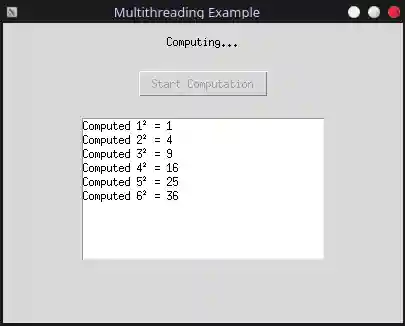
Here’s a simple example of a multi-thread application in python, which does heavy computations in the background (we are just squaring numbers in this example), while also sending the answers to a GUI thread. If this program was single-threaded, the GUI would freeze while waiting for the computation to complete. The tasks are small enough, and require communication between different tasks (GUI and computation), hence multi-threading is the right approach for this.
Show code
Code:
import tkinter as tk
import threading
import queue
import time

class Computation:
    """Handles background computation."""

    def __init__(self, messages):
        self.messages = messages

    def run(self):
        for i in range(1, 11):
            time.sleep(0.5)  # Simulate heavy computation
            result = i * i
            self.messages.put(f"Computed {i}² = {result}")

        self.messages.put("DONE")

class GUI:
    """Handles the graphical user interface."""

    def __init__(self, root):
        self.root = root
        self.root.title("Multithreading Example")
        self.root.geometry("400x300")

        self.messages = queue.Queue()

        self.label = tk.Label(root, text="Click Start")
        self.label.pack(pady=10)

        self.button = tk.Button(
            root,
            text="Start Computation",
            command=self.start_computation
        )
        self.button.pack(pady=10)

        self.listbox = tk.Listbox(root, width=40)
        self.listbox.pack(pady=10)

        # Start checking for messages
        self.root.after(100, self.check_messages)

    def start_computation(self):
        self.button.config(state="disabled")
        self.label.config(text="Computing...")

        computation = Computation(self.messages)

        thread = threading.Thread(target=computation.run)
        thread.start()

    def check_messages(self):
        try:
            while True:
                message = self.messages.get_nowait()

                if message == "DONE":
                    self.label.config(text="Finished!")
                    self.button.config(state="normal")
                else:
                    self.listbox.insert(tk.END, message)

        except queue.Empty:
            pass

        self.root.after(100, self.check_messages)

def main():
    # Create and run the GUI
    root = tk.Tk()
    app = GUI(root)
    root.mainloop()

if __name__ == "__main__":
    main()
When I run the above code, it starts the GUI thread. Clicking on the “Start Computation” button, starts a background thread which computes squares of numbers from 1 to 10, and the results get streamed to the GUI thread slowly, as they finish.
Asynchronous Programming
When some small tasks need to wait for I/O tasks (like accessing a database, writing to a file, querying a resource on the internet, scheduling a task to another system) to complete, we can use asynchronous programming.
Examples mainly include simple single-threaded applications (like servers) which run IO tasks at the same time while dealing with compute loads.
Here’s a simple example of an asynchronous fastapi server in python, which has 2 endpoints, one for I/O heavy work, and one for CPU work. Making this program multi-threaded might just waste OS resources. Making this program synchronous, would make clients requesting I/O tasks, block connections with other clients trying to call CPU tasks. The tasks are small enough, and can complete while other tasks are waiting, hence asynchronous programming is the right approach for this.
Show code
Code:
from fastapi import FastAPI
import asyncio
import threading
import uvicorn

app = FastAPI()

def thread_count():
    return threading.active_count()

@app.get("/io")
async def io_work():
    print(f"IO started | Threads: {thread_count()}")

    # Simulate lots of I/O
    for i in range(5):
        await asyncio.sleep(1)
        print(f"IO step {i + 1}")

    print(f"IO finished | Threads: {thread_count()}")
    return {"message": "I/O finished"}

@app.get("/compute")
async def compute():
    print(f"Compute started | Threads: {thread_count()}")

    result = sum(i * i for i in range(1000))

    print(f"Compute finished | Threads: {thread_count()}")
    return {"result": result}

if __name__ == "__main__":
    uvicorn.run(app, host="127.0.0.1", port=8000)
To test the above code (server), I wrote a simple multi-threaded code, to call each endpoint at the same time, to see how the server functions.
Show code
Code:
import requests
from threading import Thread
import time

def call_io():
    print("I/O Started", flush=True)

    start = time.time()
    res = requests.get("http://127.0.0.1:8000/io")
    end = time.time()

    print(f"I/O Response: {res.text}", flush=True)
    print(f"I/O Time taken: {end-start:.3f}s", flush=True)

def call_compute():
    print("Compute Started", flush=True)

    start = time.time()
    res = requests.get("http://127.0.0.1:8000/compute")
    end = time.time()

    print(f"Compute Response: {res.text}", flush=True)
    print(f"Compute Time taken: {end-start:.3f}s", flush=True)

io_thread = Thread(target=call_io)
cpu_thread = Thread(target=call_compute)

io_thread.start()
time.sleep(0.1) # wait for server to start I/O task before requesting CPU task
cpu_thread.start()

cpu_thread.join()
io_thread.join()
This is what the execution of the test shows:
Test Result:
I/O Started
Compute Started
Compute Response: {"result":332833500}
Compute Time taken: 0.003s
I/O Response: {"message":"I/O finished"}
I/O Time taken: 5.010s
This is what the server console shows:
INFO:     Started server process [305520]
INFO:     Waiting for application startup.
INFO:     Application startup complete.
INFO:     Uvicorn running on http://127.0.0.1:8000 (Press CTRL+C to quit)
IO started | Threads: 1
Compute started | Threads: 1
Compute finished | Threads: 1
INFO:     127.0.0.1:60068 - "GET /compute HTTP/1.1" 200 OK
IO step 1
IO step 2
IO step 3
IO step 4
IO step 5
IO finished | Threads: 1
INFO:     127.0.0.1:60056 - "GET /io HTTP/1.1" 200 OK
The server shows that its executing on only 1 Thread the entire time. However, the server starts the compute request AFTER starting the IO task. The server is still able to complete the compute request, without waiting for the IO to complete (as the server is running on a single thread). It does the computation, while the IO task waits.
However, IF the compute task is itself really huge, and takes a lot of time, then that would just block other connections from accessing their API endpoints (as async coroutines run sequentially, essentially serving one person at a time in this scenario).
To observe this, we can add a new API endpoint, and modify the Test code.
Show code
API endpoint:
@app.get("/compute-heavy")
async def compute_heavy():
    print(f"Compute started | Threads: {thread_count()}")

    result = sum(i * i for i in range(100_000_000)) # should take 6 secs

    print(f"Compute finished | Threads: {thread_count()}")
    return {"result": result}
Test code:
import requests
from threading import Thread
import time

def call_compute(id):
    print(f"Compute {id} Started", flush=True)

    start = time.time()
    res = requests.get("http://127.0.0.1:8000/compute-heavy")
    end = time.time()

    print(f"Compute {id} Response: {res.text}", flush=True)
    print(f"Compute {id} Time taken: {end-start:.3f}s", flush=True)

cpu_thread1 = Thread(target=call_compute, args=(1,))
cpu_thread2 = Thread(target=call_compute, args=(2,))

cpu_thread1.start()
cpu_thread2.start()

cpu_thread1.join()
cpu_thread2.join()
This is what the execution of the test shows:
Test Result:
Compute 1 Started
Compute 2 Started
Compute 1 Response: {"result":333333328333333350000000}
Compute 1 Time taken: 7.637s
Compute 2 Response: {"result":333333328333333350000000}
Compute 2 Time taken: 14.903s
This is what the server console shows:
INFO:     Started server process [91457]
INFO:     Waiting for application startup.
INFO:     Application startup complete.
INFO:     Uvicorn running on http://127.0.0.1:8000 (Press CTRL+C to quit)
Compute started | Threads: 1
Compute finished | Threads: 1
INFO:     127.0.0.1:47804 - "GET /compute-heavy HTTP/1.1" 200 OK
Compute started | Threads: 1
Compute finished | Threads: 1
INFO:     127.0.0.1:47806 - "GET /compute-heavy HTTP/1.1" 200 OK
Essentially, User 1 in this scenario got result within 7s of calling the endpoint, and User 2 got response 14s after calling the endpoint. This demonstrates how async code is bad for CPU bound task (where CPU bound tasks essentially act like sequentially running tasks).
FastAPI allows us to replace async functions with normal functions, this makes it so FastAPI schedule each non-async function on a different thread if needed. We can demonstract the same code from before, but convert the compute-heavy endpoint into a non-async function.
Show code
API endpoint:
@app.get("/compute-heavy")
def compute_heavy():
    print(f"Compute started | Threads: {thread_count()}")

    result = sum(i * i for i in range(100_000_000)) # should take 6 secs

    print(f"Compute finished | Threads: {thread_count()}")
    return {"result": result}
This is what the execution of the test shows:
Test Result (with GIL enabled, server is allowed to run on multiple cores):
Compute 1 Started
Compute 2 Started
Compute 2 Response: {"result":333333328333333350000000}
Compute 2 Time taken: 32.175s
Compute 1 Response: {"result":333333328333333350000000}
Compute 1 Time taken: 32.542s
Test Result (with GIL enabled, but server is also forced to run on a single core):
Compute 1 Started
Compute 2 Started
Compute 2 Response: {"result":333333328333333350000000}
Compute 2 Time taken: 14.818s
Compute 1 Response: {"result":333333328333333350000000}
Compute 1 Time taken: 14.927s
Test Result (with GIL disabled, single-core):
Compute 1 Started
Compute 2 Started
Compute 2 Response: {"result":333333328333333350000000}
Compute 2 Time taken: 15.382s
Compute 1 Response: {"result":333333328333333350000000}
Compute 1 Time taken: 15.622s
Test Result (with GIL disabled, multi-core):
Compute 1 Started
Compute 2 Started
Compute 1 Response: {"result":333333328333333350000000}
Compute 1 Time taken: 6.098s
Compute 2 Response: {"result":333333328333333350000000}
Compute 2 Time taken: 6.258s
This is what the server console shows:
INFO:     Started server process [92857]
INFO:     Waiting for application startup.
INFO:     Application startup complete.
INFO:     Uvicorn running on http://127.0.0.1:8000 (Press CTRL+C to quit)
Compute started | Threads: 3
Compute started | Threads: 3
Compute finished | Threads: 3
INFO:     127.0.0.1:45750 - "GET /compute-heavy HTTP/1.1" 200 OK
Compute finished | Threads: 3
INFO:     127.0.0.1:45748 - "GET /compute-heavy HTTP/1.1" 200 OK
The server now shows us that, it creates/uses 3 Threads, instead of just 1 Thread.
I assume, 1 Thread for the main server process of listening to new connections, 1 Thread for compute1, 1 Thread for compute2.
The above test results explain the entire story very easily. GIL essentially makes python act concurrently for CPU bound tasks.
- Running the python server when GIL is enabled, and on multi-core, the GIL has to juggle between multiple cores, caches, contexts trying to execute the threads, and hence takes a lot of time to execute both the threads. However, both threads do run “parallely”, and hence return together.
- Running the python server with GIL enabled, and on single-core, makes it so the GIL can just execute the program on one core, and it doesn’t have to deal with multiple cores. Therefore, both threads still execute together parallely under the OS, and hence return at the same time, but as GIL runs CPU bound tasks concurrently, both tasks take 14s together, even if a single task should take 7s.
- Running the python server with gil disabled, and on single-core, gives similar results to when GIL is enabled but forced to run on a single core. Both tasks return together, but take 15s in total, as the CPU scheduler is essentially running the tasks concurrently.
- Running the python server with gil disabled, and on multi-cores, gives true parallelism, and hence the tasks both return after 6s, which is what each task takes on average. This proves that the threads are actually being run on multiple cores parallely.
Fastapi (Uvicorn), allows us to run servers on multiple processes. As python GIL is only for multi-threading, and not multi-processing, we can achieve GIL-free parallelism by just running the server on multiple processes, even if GIL exists.
Show code
server.py:
from fastapi import FastAPI
import threading
import os

app = FastAPI()

def thread_count():
    return threading.active_count()

def whoami():
    return os.getpid()

@app.get("/compute-heavy")
def compute_heavy():
    print(f"Compute started | Threads: {thread_count()} | PID: {whoami()}")

    result = sum(i * i for i in range(100_000_000)) # should take 7 secs

    print(f"Compute finished | Threads: {thread_count()} | PID: {whoami()}")
    return {"result": result}
To start server.py, we run: PYTHON_GIL=1 uvicorn server:app --host 127.0.0.1 --port 8000 --workers 3
PYTHON_GIL=1 is an environment variable in linux, which makes python enable GIL if GIL is disabled by default in python 3.14t version.
--workers 3 starts 2 child process.
Test Result (with GIL enabled, multi-core):
Compute 1 Started
Compute 2 Started
Compute 1 Response: {"result":333333328333333350000000}
Compute 1 Time taken: 6.428s
Compute 2 Response: {"result":333333328333333350000000}
Compute 2 Time taken: 6.671s
This is what the server console shows:
INFO:     Uvicorn running on http://127.0.0.1:8000 (Press CTRL+C to quit)
INFO:     Started parent process [95675]
INFO:     Started server process [95678]
INFO:     Waiting for application startup.
INFO:     Application startup complete.
INFO:     Started server process [95677]
INFO:     Waiting for application startup.
INFO:     Application startup complete.
Compute started | Threads: 3 | PID: 95677
Compute started | Threads: 3 | PID: 95678
Compute finished | Threads: 3 | PID: 95678
INFO:     127.0.0.1:48230 - "GET /compute-heavy HTTP/1.1" 200 OK
Compute finished | Threads: 3 | PID: 95677
INFO:     127.0.0.1:48216 - "GET /compute-heavy HTTP/1.1" 200 OK
Therefore, we can see the application show true parallelism, by executing the 6s task on multiple cores/processes at the same time. We also see the server show that each compute task was scheduled on different processes, which internally is being scheduled on different CPU cores in my scenario.
Forcing the server to run multiple procs on a single core, takes 14s again:
Compute 1 Started
Compute 2 Started
Compute 2 Response: {"result":333333328333333350000000}
Compute 2 Time taken: 14.822s
Compute 1 Response: {"result":333333328333333350000000}
Compute 1 Time taken: 14.822s
As each proc is run concurrently on a single CPU, instead of parallely.
Before I end this post, I’ll come clean about the task size classification. You should not chose the parallel model just by your task size. You should chose the right model based on the type of parallel job.
| Task | Best Model | Worst Model* |
|---|---|---|
| CPU Bound | Proc/Thread | Async |
| I/O Bound | Async | Proc/Thread |
| High Comm. Freq. | Async/Thread | Proc |
Sometimes, the choice is not as black-and-white, as the above table might suggest. Sometimes your hardware architecture, scheduling overhead, etc information can affect your decision about the parallel model you chose for your job.
*Worst Model = Might not work well, might waste resources, and is just generally worse
References
- https://userpages.cs.umbc.edu/jtang/…
- https://www.geeksforgeeks.org/operating-systems/difference-between-concurrency-and-parallelism/
- https://www.geeksforgeeks.org/operating-systems/cpu-scheduling-in-operating-systems/
- https://www.geeksforgeeks.org/operating-systems/difference-between-process-and-thread/
- https://www.geeksforgeeks.org/operating-systems/process-in-operating-system/
- https://www.geeksforgeeks.org/operating-systems/thread-in-operating-system/
- https://docs.python.org/3/howto/free-threading-python.html
- https://www.geeksforgeeks.org/python/what-is-the-python-global-interpreter-lock-gil/
- https://github.com/python/cpython/commit/…
- https://www.reddit.com/r/…
- https://en.wikipedia.org/wiki/Synchronization…
- https://en.wikipedia.org/wiki/Single_instruction…
- https://docs.nvidia.com/cuda/cuda-programming-guide/index.html
Enjoy Reading This Article?
Here are some more articles you might like to read next: